Mrs. Monday Jumper

Phidippus princeps female | Howell Co., Missouri

Phidippus princeps female | Howell Co., Missouri

In my previous post, Monday Jumper, I featured a photo of a strikingly colored jumping spider (family Salticidae) that apparently represents an adult male Phidippus princeps. Far too skittish to attempt photographing in the field, I placed him in a vial and photographed him later in the hotel room but still only got one photo that was good enough to post. Shortly after gathering him up, I came across another jumping spider that proved far more cooperative for field shots. This was no doubt due in large part to the fact that she had just captured a fat, juicy caterpillar. I find predaceous insects to be far less skittish when they are involved in the act of consuming prey. This not only makes them easier to approach and photograph, but also adds a desirable natural history element to photos that is sometimes missing in “portrait-only” photographs.

Somber coloration, large abdomen, and small carapace contrast distinctly with the male

Somber coloration, large abdomen, and small carapace contrast distinctly with the male

I say “she” because of the classic female characters exhibited—relatively large and rounded abdomen (males tend to have a smaller and more tapered abdomen), smaller carapace, somber coloration, and absence of a “boxing glove” aspect to the pedipalps. Like the male I had just collected, she was on the foliage of an oak sapling, and as I began taking photographs I noticed in the preview screen the brilliant, metallic blue chelicerae that are a hallmark of the large salticid genus Phidippus. I had also presumed the male I had just collected belonged to this same genus based on gestalt, but I could have never imagined that the two individuals actually represented male and female of the very same species. Such appears to be the case, however, as a thorough perusal of the salticid galleries at BugGuide leads me to believe that the individual featured here is the adult female of Phidippus princeps.

Check out those metallic blue chelicerae!

Check out those metallic blue chelicerae!

These photos still may not approach the technical and aesthetic perfection exhibited by master salticid portraitist Thomas Shahan, but I think they do represent an improvement over my first attempt at photographing a feeding female. The first two photos are fine, but the third suffers from the focus being a little too “deep”, which seems to be my most frequent macrophotography mistake on higher mag shots. If you have any tips on how to overcome this particular problem I am all ears!

© Ted C. MacRae 2014

Monday Jumper

Phidippus pinceps, adult male | Howell Co., Missouri (studio shot).

Phidippus princeps, adult male | Howell Co., Missouri (studio shot).

A couple of weeks ago, shortly after my friend Rich and I began hiking a 9-mile stretch of the North Fork Section of the Ozark Trail in the far southern reaches of Missouri, we encountered this colorful jumping spider (family Salticidae) on the foliage of an oak sapling. He was not at all in the mood to be photographed—dashing persistently from one side of the leaf to the other and finally dropping to the ground as I tried to close in for some shots. So active was the little guy, that even had I managed to get him within the camera’s field of view it would have been nearly impossible to get him properly focused, much less achieve a nice composition. Hoping he would be a little easier to work with in the confines of a hotel “studio”, we coaxed him into a vial with a sprig of foliage and then got him out and placed him on a branch of dogwood flowers (Cornus florida) that evening once we were in our room. Yes—he was easier to work with, but only by the fact that being in a hotel room made it more difficult for him to escape! He was just as active as in the field, darting from flower to flower in his persistent efforts to elude the large glass eye that kept trying to look at him. For many subjects, I would have given up rather than spend an inordinate amount of time trying to get photographs that likely would not turn out to be what I wanted. But this spider was just so attractive—red and black and white with flashy blue chelicerae! I persisted in my efforts, got about two dozen shots off before he finally did escape, then promptly deleted all but five immediately after seeing them on the computer. The photo shown here is the only “keeper” that I can actually bring myself to post—the focus is a bit too deep, but not so much that it detracts greatly from what is otherwise a fairly decent composition. The more I shoot jumping spiders, the more I am amazed at the portraits that Thomas Shahan achieves with these delightful little arachnids.

After browsing through the salticid galleries at BugGuide, I am inclined to believe this is the species Phidippus princeps, with the coloration and white-stripes on the pedipalps suggesting it is an adult male. ID correction welcome.

© Ted C. MacRae 2014

One-shot Wednesday: pale green assassin bug

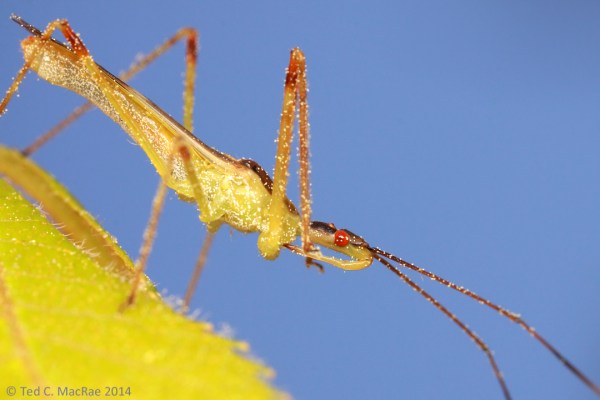
Zelus luridus (pale green assassin bug) | Howell Co., Missouri.

Zelus luridus (pale green assassin bug) | Howell Co., Missouri.

As my friend Rich and I set out a week ago Sunday on the final stretch in our quest to hike the 350-mile Ozark Trail in its entirety, I saw this slender, green assassin bug (family Reduviidae) sitting on a tender young leaf of an oak sapling. I already had my camera out but had outfitted with the 65-mm, 1–5× macro lens in anticipation of small beetles that I wanted to photograph on dogwood flowers. Nevertheless, it was still a bit on the cool side, making me think I might yet succeed in getting off some super-closeup shots of this delicate predator. I managed to carefully snip the leaf from the sapling and move the bug up close to the camera for a nice, blue-sky background shot, but one shot is all I got—as soon as the shutter clicked the bug took flight and left me with this single photo. As I have observed to usually be the case, the body of this individual is thickly covered with debris, which I take to be pollen from the abundant oaks at the height of their flowering period.

I’ve seen this species regularly over the years during my springtime forays in upland, oak-hickory Ozark forests. I presume the species is Zelus luridus, based on an online synopsis of the genus Zelus in eastern North America. As true bugs go, assassin bugs are undeniably cool—sometimes large, often colorful, and pure predators! Interestingly, these bugs have adopted a rather diverse array of strategies to assist their predaceous habits, mostly involving modifications of the front legs. Some involve a more typical raptorial design (similar to mantids) with chelate surfaces or even spines on the femora and tibiae, while others have developed flexible, cushion-like structures on the tips of the tibiae to aid in prey handling (Weirauch 2006). Gross morphological modifications, however, are not the only strategy employed by assassin bugs—some groups use secretions either to paralyze or immobilize their prey. Species in the genus Zelus employ the latter strategy—essentially using their front legs as “sticky traps”. The sticky substance is derived from glands on the front legs and is used to coat numerous, microscopically branched setae on the legs called “sundew setae” in reference to the similarity of appearance and function with insectivorous sundew plants. Interestingly, sundew setae have also been found on other parts of the body, at least in first-instar Z. luridus nymphs, leading to speculation that they may also serve some other function besides prey capture. Perhaps these setae explain why most individuals I see are so debris-covered, as with the pollen-laden individual above.

REFERENCE:

Weirauch, C. 2006. Observations on the sticky trap predator Zelus luridus Stål (Heteroptera, Reduviidae, Harpactorinae), with the description of a novel gland associated with the female genitalia. Denisia 19, zugleich Kataloge der OÖ. Landesmuseen
Neue Serie 50:1169–1180 [pdf].

© Ted C. MacRae 2014

Baby box turtle on white

Box turtles of the genus Terrapene are extraordinarily common in Missouri, especially in the eastern and southern forested regions of the state where the three-toed box turtle (T. carolina triunguis)—Missouri’s state reptile—is the most commonly encountered form. Despite this abundance and the author’s more than a half-century spent scrabbling through the sticks of Missouri, I have never encountered a youngster as tiny as the one shown in this post (shell length about 2 inches). In fact, I didn’t even find it—my daughter rescued it from our dog, who had found it crossing the gravel driveway at our family’s cabin west of St. Louis. Such overwhelming cuteness demanded a photo session, and rather than deal with the active little hatchling’s persistent efforts to duck into the leaf litter I decided to photograph it on a clean, white background and arrange some of the photos in a “Naskreckian” collage. My daughter wanted to keep the little guy, but eventually she agreed that it would be better off released back into the forest. While it may lead a more perilous life in the forest, the opportunity to dine on fresh earthworms and strawberries should make up for it, and from these photos my daughter can always remember it for the little pup it once was.

Box-turtle-collage_1080x1407

Copyright © Ted C. MacRae 2014

An arboreal fishing spider

Last week was my birthday, and as is my usual custom I took the day off in favor of the season’s first “official” bug collecting trip. Falling in late April as it does, my birthday usually coincides nicely with insect activity beginning in earnest here in Missouri, and for this year’s edition I decided to look for Cicindela scutellaris lecontei (Leconte’s Tiger Beetle) on sand prairies in the extreme northeastern corner of the state. Sadly, this year’s unusually protracted spring had resulted in a mostly still-sleeping landscape, and whatever hopes I had of seeing the earliest emerging adults were dashed as thick, gray clouds hung stubbornly in the sky and temperatures refused to edge much above 60°F. Still, a bad day of collecting is better than a good day of just about anything else, and in such situations there are still wintertime collecting methods—peeling bark, cutting wood, breaking stems, etc.—at my disposal.

The "W"-shaped markings on the abdomen with interrupted white borders distinguish this species from the otherwise similar D. scriptus (xxx fishing spider).

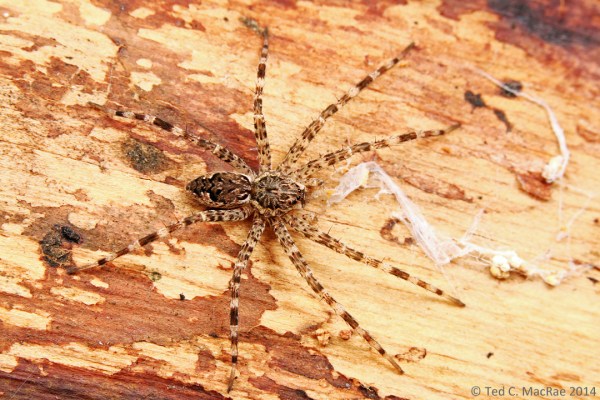
Dolomedes tenebrosus (dark fishing spider) | Frost Island Conservation Area, Clark Co., Missouri.

While exploring a sand prairie at Frost Island Conservation Area (Clark Co.), I found a large, dead willow in one of the draws that had apparently been killed by recent prescribed burning activities, and when I peeled back a section of the trunk bark I found this medium-sized spider (leg spread ~40 mm) sitting underneath. Based on general appearance I first thought it was some type of wolf spider, although it struck me odd that it would be under the bark of a tree rather than on the ground where wolf spiders are normally encountered. However, after consulting BugGuide and not finding it among the wolfies, I decided to widen the net and quickly stumbled onto the fishing spiders (genus Dolomedes, family Pisauridae). I’ve seen fishing spiders before—normally they are found at water’s edge and periodically demonstrate a remarkable ability to dash across the surface of the water to grab an errant insect, using the same surface tension for support that had trapped its hapless prey. As odd as it would have been to find a wolf spider high up in a tree, it seemed even more unlikely that I would find a fishing spider in such a dry, arboreal habitat. Things became clearer, however, after I settled on the species D. tenebrosus (dark fishing spider)—distinguished from other fishing spiders by the interrupted white borders behind the “W”-shaped markings on the abdomen (see BugGuide). According to Jacobs (2002) this species is frequently found far away from water, usually in wooded settings, and hibernates as an immature adult (penultimate instar) under—you guessed it—loose bark (also stones). Barnes (2003) also provides a good discussion of this spider along with diagnostic photos and references for further reading.

Dolomedes tenebrosus (dark fishing spider) | Clark Co., Missouri

The “W”-shaped markings on the abdomen with interrupted white borders distinguish this species.

Based on this information, I’m guessing this individual is a still hibernating subadult, presumably a female based on the small pedipalps (the little “legs” next to the mouth). The spider moved slowly across the exposed wood as I took these photographs, wandering onto sections of different color as she did. I like the two photos for different reasons—the first (light background) seems to better show the shape and silhouette of the spider, while the second (dark background) highlights the spider’s beautifully intricate markings.

REFERENCES:

Barnes, J. K. 2003. Dark fishing spider. University of Arkansas Arthropod Museum Notes 15 [full text].

Jacobs, S. 2002. Fishing spider, Dolomedes tenebrosus. PennState College of Agricultural Sciences Insect Fact Sheet [full text].

Copyright © Ted C. MacRae 2014

The importance of post-processing

One of the most frustrating realizations I had when I began photographing insects was the fact that photographs didn’t come out of the camera “ready-to-go”—i.e., they still needed to be processed to some degree to make them look good. Even worse, this required processing is to large degree subjective based on the taste of the individual photographer, and as such a “quick manual” describing the exact process in a way that beginners can understand doesn’t exist. Essentially, I didn’t know that when I decided to become an insect photographer, that I would also have to become proficient at photo processing. This frustrates me a lot less now because I’ve finally worked out a process for doing this that works for me and that I am comfortable with, and having done so I also realize that every photographer has to go through this process for themselves to make their photographs look the way they want them to look. That said, I wish I’d had access to some easy tutorials when I was trying to figure out the process that could have saved me some stumbling time before arriving at a process I liked. With that in mind, I thought I would share a quick overview of how I deal with post-processing in the hopes that somebody else mind find a useful tip or two here as they try to figure out their own process. This is not meant to be an exhaustive description of all the post-processing tools that I might use, but rather the typical adjustments that are needed for almost all of the photographs that I take. To illustrate the process, I use a rather basic shot of a cricket that I photographed last week in northeastern Missouri. You can click on each photo to access a larger and better see the issues discussed and resulting enhancements.

Straight from the camera (JPG converted from original RAW file).

The photo above is basically how the shot came out of the camera. These days I shoot only in RAW format, as this allows the maximum amount of data to be retained regardless of how many times the file is accessed. The image above is a JPG converted directly from the unaltered RAW file, and you can see that it looks rather flat and could benefit from levels and color adjustments as well as sharpening and some general “cleaning up” of sensor dust artifacts and debris on the subject. Since I use a Canon body, I have the Digital Photo Professional software that came with the camera, and I also have Photoshop Elements. For my purposes, I’ve found it most convenient to do certain enhancements directly to the RAW file in DPP, generate a TIFF format version of the file from the edited RAW file, and then do the final enhancements to the TIFF file. Since TIFF is also a “loss-less” format, I can then use the enhanced TIFF to generate JPGs of whatever size and resolution on an as-needed basis without worrying about data loss in the full-sized, fully enhanced version of the photo. I think this is preferable to shooting JPGs directly or generating them directly from the RAW file because JPGs are not loss-less files, and as a result every time a JPG is accessed or modified there is a loss of data. Sure, you can go back to the original RAW file and generate a new JPG, but any enhancements made after the first conversion will have to be repeated. Another advantage to making adjustments in DPP is that they are reversable—the original, unaltered RAW file can always be recovered without the need to create multiple backups representing different stages of enhancement.

After initial processing (JPG converted from edited RAW file).

So, what enhancements do I do in DPP? First I open the tool palette and adjust the white balance—in this case it was a full flash photo, so I select “Flash” from the drop-down menu. Then I select the RGB tab and adjust the upper and lower levels on the histogram. The general approach is to cut off data-lacking areas at either extreme, but there is also a lot of subjectivity in deciding what “looks right”. I then open the Stamp Tool (I find cloning adjustments easier and more effective in DPP than in PS) and clone out dust marks in the background (I know, I need to clean my sensor) and debris on the subject. On that last point, there are purists who will argue that this is an “unnatural” alteration. I take a much less conservative position on such alterations, since in my opinion the entire photograph itself is the result of interpretation—not just of the photographer, but of the equipment used and settings chosen. If debris on the subject is an important aspect of the subject’s natural history, then it should remain. However, in most cases, dirt flecks on the subject are not an important part of the story and provide an unnecessary detraction from the aesthetic appearance of the photo. If any cropping is necessary I prefer to do this also in DPP since this is reversible should I change my mind at some point in the future. The second photo above shows what the image looks like after this initial round of post-processing in DPP. At this point, the RAW file is ready to be converted to TIFF format for final post-processing in PS.

After additional processing in Photoshop (jpg converted from edited TIFF).

After additional processing in Photoshop (jpg converted from edited TIFF).

Because I’ve done much of the levels adjustment and cloned out any flaws in DPP, the original TIFF needs only minor adjustments. I generally like to start with “Autocorrect” and see what it does, as this function usually does a good job of toning down highlights and shadows and especially giving a more natural color to blue sky backgrounds such as in this photo. If I don’t like the result from Autocorrect, I hit Ctrl+Z and adjust levels and color manually until I like the result. I find that most photos still benefit from a little bit of brightening and increased contrast (usually ~10% each), and this often also serves to add a little color saturation that is generally sufficient but can sometimes be too much. If the latter occurs, it’s an easy matter to adjust the saturation back down a little bit. After the levels and color are fully adjusted the only thing left to do is apply unsharp mask to sharpen up the photo and bring out the detail—remember to zoom the image to 100% to get the best view of how the settings affect the appearance of the photo, as the settings that you will need depend greatly on the size of the image. Once these adjustments are made, I save a new version of the file (I like to append the file name with “_enh”). The third photo above represents the final enhanced version, and it is this file that I will use to generate JPGs of whatever size I need on an as-needed basis. The original TIFF can be retained if desired, but since an identical version can always be generated anew from the enhanced RAW file this is not essential.

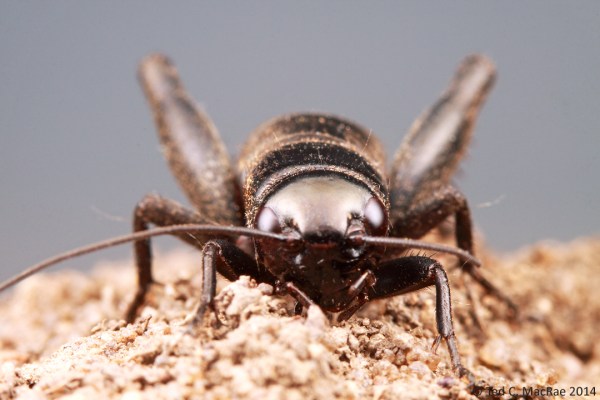
The head slightly narrower than the pronotum and early spring occurrence of this large nymph make me think this is the northern woods cricket (Gryllus vernalis).

The head slightly narrower than the pronotum and early spring occurrence of this large nymph in northeastern Missouri make me think this is the northern wood cricket (Gryllus vernalis).

I hope you’ve found one or tips of use in this little tutorial, which I end with the above frontal portrait of the subject shown in the previous photos. Based on its all black color, the head slight narrower than the pronotum, and its early spring occurrence as a late-instar nymph in northern Missouri, I take this to be a northern wood cricket, Gryllus vernalis, but of course I am open to being corrected by somebody more knowledgeable about crickets than I.

Copyright © Ted C. MacRae 2014

I’m a fun guy!

The habit of looking at things microscopically as the lichens on the trees & rocks really prevents my seeing aught else in a walk.—Henry David Thoreau

I should have loved an opportunity to go for a walk in the woods with Thoreau—especially during the winter when my preoccupation with insects no longer restrains my fascination with all things natural. While many entomologists see winter as a break from field work—a time to indulge/suffer (depending on mood) the more mundane curatorial tasks associated with their studies, my time in the field continues uninterrupted with long walks in the woods. Hiking stick replaces insect net. Energy foods replace vials. I still pry bark and flip rocks—I cannot completely ignore the potential to find insects. But I also peer through miniature forests of moss, poke about the mushrooms on a fallen log, and squint at the lichens encrusting a rock. Yes, insect specimens collected during the previous summer still need to be pinned, but there is time for that. There will always be time for that—if not now then in my later years when my ability to scramble through the bush begins to wane. For now, the woods sing their siren song, and I must listen.

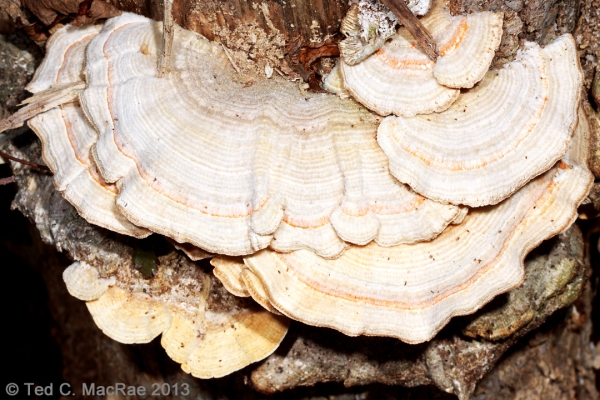
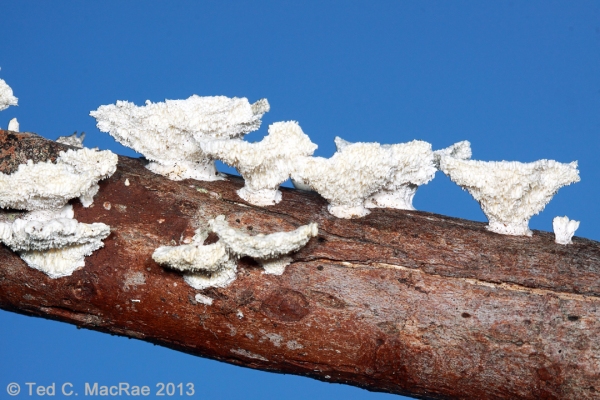
Trichaptum biforme (purple tooth) on fallen river birch (Betula nigra) | Reynolds Co., Missouri

Trichaptum biforme on fallen trunk of Betula nigra | Reynolds Co., Missouri

Purple tooth (Trichaptum biforme) on dead red maple (Acer rubrum) | Reynolds Co., Missouri

Trichaptum biforme on fallen branch of Acer rubrum | Reynolds Co., Missouri

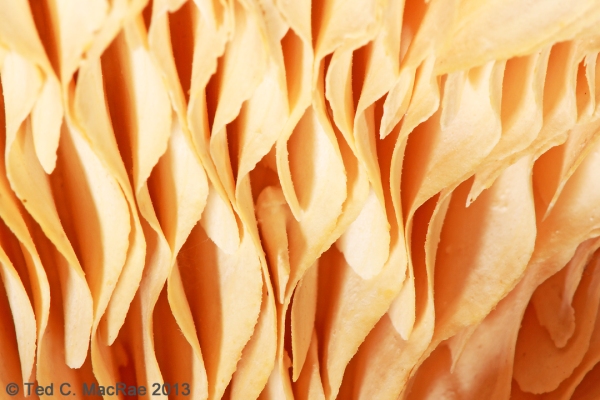
Multicolored gilled polypore (Lenzites betulina) on river birch (Betula nigra) stump | Reynolds Co., Missouri

Lensites betulina on dead stump of Betula nigra | Reynolds Co., Missouri

"Gills" distinguish this shelf fungus from turkey tails and other similar types.

“Gills” distinguish this shelf fungus from turkey tails and other similar types.

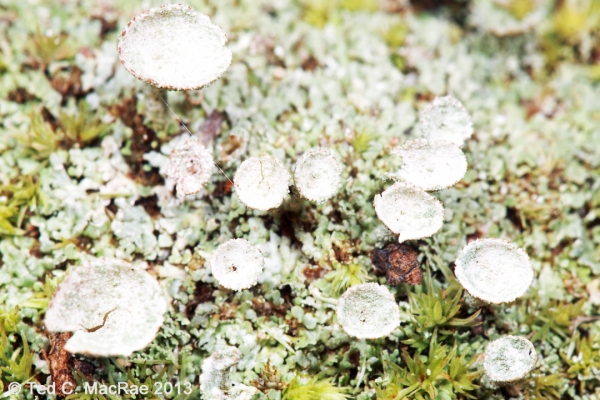
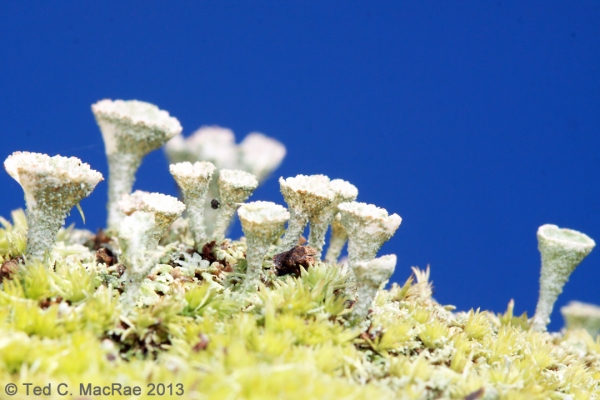
Cladonia chlorophaea or C. pyxidata on chert-trail | Reynolds Co., Missouri

Cladonia sp. (poss. C. chlorophaea or C. pyxidata) on chert-trail | Reynolds Co., Missouri

(Cladonia pyxidata)

A forest in miniature!

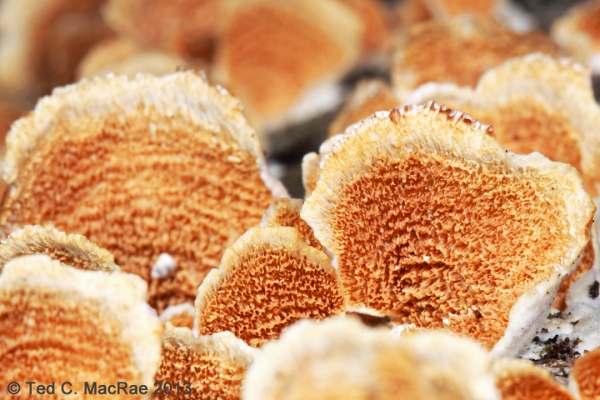
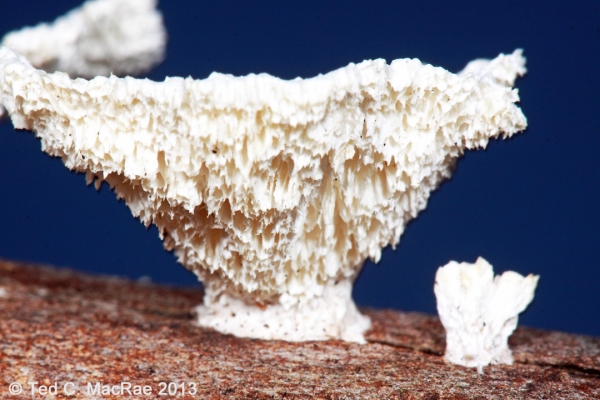
Irpex lacteus? on fallen branch of Acer rubrum | Iron Co., Missouri

Irpex lacteus (?) on fallen branch of Acer rubrum | Iron Co., Missouri

Spores are released from the toothy cap underside

Spores are released from the toothy cap underside

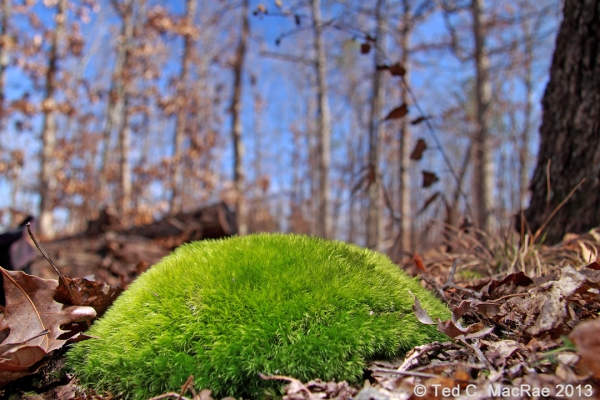
Leucobryum glaucum on forest floor | Reynolds Co., Missouri

Leucobryum glaucum on forest floor | Reynolds Co., Missouri

Postscipt: all photos shown taken on 30 November 2013 while hiking a 7-mile stretch of the Ozark Trail (Karkaghne Section in Reynolds Co. and Middle Fork Section in Iron Co.).

Copyright © Ted C. MacRae 2014

How to be an “iPhone nature photographer”

My passion for insect macro-photography is well known, so it may come as a surprise to learn that I have, during the past year or so, also become an avid “iPhone photographer”—i.e., I actually use my iPhone for “real” photography and not just selfies or quick snapshots. This is not to say that an iPhone can do everything that a digital SLR camera can do, especially when one considers the resolution of and wealth of lens options available for the latter. Nevertheless, as the world’s best selling smart phone, the iPhone has, by way of its camera function, also become the world’s best selling camera, and even though it cannot match the power of a dSLR, there are certain situations and types of photos for which the iPhone is perfectly adapted. Having gained some level of proficiency in learning what the iPhone can and cannot do when it comes to photography, I thought I would offer this photo set of a hike I did today along the Courtois Section of the Ozark Trail as a primer for the types of photos at which iPhones excel, along with some tips and tricks I’ve learned to get the most of the iPhone’s capabilities.

An iPhone is basically a fully automated, wide-angle camera (although the user can control exposure to some extent by touching the screen at the desired point). As such, it excels at landscape and general nature photos, and its small-diameter lens also allows some use for “wide-angle macro.” iPhones do not do well in low light situations or take true macro photographs (although one can use a variety of “clip-on” lenses to achieve fairly decent macro-photographs of larger insects—I have not tried this myself). As a result, I tend to use the iPhone mostly in good light situations and break out the big camera when the lighting is more challenging or if I want to take “real” macrophotographs. As with all digital photographs, good post-processing is necessary for making iPhone photos look their best, and in general a more aggressive approach than is typical for dSLR photographs will be required. The photos that follow are intended not only to give a flavor of the day’s hike, but also demonstrate my photographic approach and provide tips on composition, exposure, and post-processing. If you have gained experience in iPhone photography and have additional tips and tricks that you would like to share, I would greatly appreciate hearing about them in the comments.

Courtois Creek - immediately at the start we had to make a decision whether we could ford the creek. It was obviously too deep in most places, and we almost turned back, but then saw a path that looked like it might be passable. With air temps of 22F, we stripped off our pants, boots, and socks, packed them in our backpacks, and waded through frigid water that reached just below our hips before reaching the other side. Rich brought a towel, so we were able to dry off before getting dressed again. The whole process took almost a full half-hour.

Courtois Creek – immediately at the start we had to make a decision whether we could ford the creek. It was obviously too deep in most places, and we almost turned back, but then saw a path that looked like it might be passable. With air temps of 22F, we stripped off our pants, boots, and socks, packed them in our backpacks, and waded through frigid water that reached just below our hips before reaching the other side. Rich brought a towel, so we were able to dry off before getting dressed again. The whole process took almost a full half-hour.

This photo was taken into the sun, which can easily result in a washed out sky. To avoid this, I minimized the amount of sky in the photo (which also allowed the ripples in the foreground to be included for a sense of motion) and then touched the screen on the sky to set the exposure. This resulted in a dark photo, but it preserved the rich colors which could then be brought out with aggressive brightening and increasing the contrast in Photoshop. A standard set of commands that I generally use for all iPhone photos (slightly increased saturation, sharpening, and de-speckling) produced the finished version.

Bluffs along Courtois Creek - massive bluffs along the other side of the creek sported fallend boulders the size of dump trucks.

Bluffs along Courtois Creek – massive bluffs along the other side of the creek sported fallen boulders the size of dump trucks.

Another photo taken in the direction of the sun, causing the shadowed side of the rock to turn out very dark. Again I touched the screen on the sky to preserve the blue color and then aggressively lightened in Photoshop. Aggressive brightening generally requires a more aggressive increase in contrast, followed by the standard command set mentioned for the first photo.

We were feeling good about our decision to ford the creek as we hiked below spectacular bluffs.

We were feeling good about our decision to ford the creek as we hiked below spectacular bluffs.

This photo required fairly minimal post-processing since it was shot away from the sun and, thus, had decent native exposure. The bluff face was a little dark and needed minor brightening, but as always I set the exposure in the brightest area of the photo and then post-corrected the dark areas (this is much easier than the opposite, i.e., darkening areas that are too bright, as such areas are often blown and cannot be fixed).
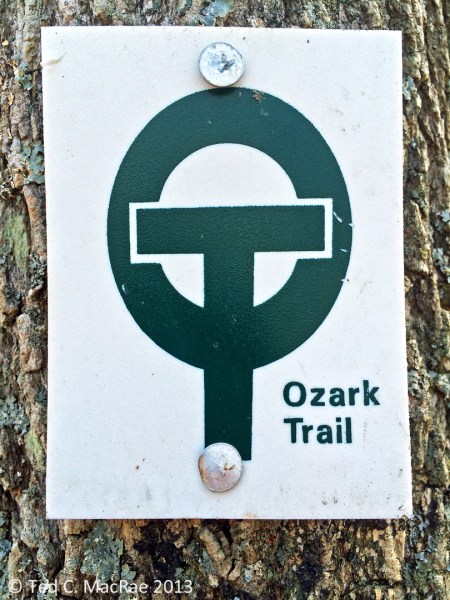
Ozark Trail blaze.

Ozark Trail blaze.

A very close-up shot of a trail blaze. The main watch out with such photos is to ensure the plane of the camera matches the subject precisely, otherwise distortion will cause elongation of one side (making the blaze a trapezoid rather than a rectangle). In post-processing I set the white point in levels by greatly magnifying the image and clicking on a very white part of the blaze to get a more natural looking white rather than the dirty gray that often results when shooting largely white subjects.

Blufftop view of Courtois Creek - from a vantage point several hundred feet above the creek we could look down on our crossing point. I have a fear of heights but nevertheless hung onto the treefall in front of me to inch out for a clear view.

Blufftop view of Courtois Creek – from a vantage point several hundred feet above the creek we could look down on our crossing point. I have a fear of heights but nevertheless hung onto the tree fall in front of me to inch out for a clear view.

This was another photo taken fairly towards the sun. I wanted just a thin band of sky to add a sense of scale to the downward-looking view, but with little sky the camera automatically wanted to expose for the darker foreground, thus blowing the sky. To prevent this, I tilted the camera up slightly to get more sky, touched the screen on the sky to set exposure, then tilted back down to the composition I wanted and took the shot. Post-processing involved aggressive brightening as described for the first two photos above.

Sapsucker damage on an old tree.

Sapsucker damage on an old tree.

I approached this tree from an angle facing the sun, so I simply waited until we passed it and could turn to place the sun behind me while shooting this tree. The trick is to get the right distance for a composition that doesn’t include too much wasted space at the foot of the tree or in its canopy, so this requires some walking back and forth until the right composition is achieved (I do not use the zoom function on the camera unless I have to because of the loss of resolution).
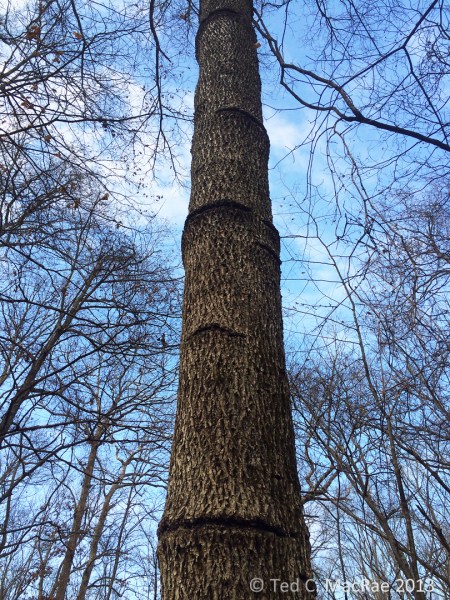
Close-up view of sapsucker damage. Obviously they have been using this tree for many years

Close-up view of sapsucker damage. Obviously they have been using this tree for many years

A closer view of the sapsucker damage—again this is mostly a compositional challenge, which I met by getting close enough to have this interesting “looking up” perspective but still far enough away to include the lowest ring of damage at the bottom of the photo and the highest at the top. Little post-processing other than the standard set was required for this sun-behind-me photograph.

Crystallifolia forms when water drawn from the soil by certain plants oozes out of the stem and contacts frigid air. Additional water pushes out the ice, then freezes itself, resulting in long, thin ribbons of ice that curl around themselves

Crystallofolia forms when water drawn from the soil by certain plants oozes out of the stem and contacts frigid air. Additional water pushes out the ice, then freezes itself, resulting in long, thin ribbons of ice that curl around themselves

For photographing crystallofolia and other small, ground-dwelling features, I like to turn the iPhone so that the lens is on the bottom edge to achieve a true ground-level perspective. The macro capabilities of the iPhone are limited, so in this case I used the zoom function (maybe about 1/3 to full zoom), centered the feature in the photo to get the best exposure and focus, and then did a little more cropping post-processing at the bottom of the photo to minimize the amount of blurred foreground. Again, a mostly white subject such as this tends to come out dull in the native photograph, so I enlarged the image greatly in Photoshop, opened Levels, clicked on set white point, and then clicked on the whitest portion of the subject that I could find to achieve a more ‘naturally’ white subject. It can take a few tries to find a spot in the image that doesn’t result in unnatural over-whitening of the subject—one must play around a bit to find it.

Crustose lichens abound on the dolomite bedrock exposures along the "Narrows" - a long, narrow ridge between the Courtois and Huzzah Creek Valleys.

Crustose lichens abound on the dolomite bedrock exposures along the “Narrows” – a long, narrow ridge between the Courtois and Huzzah Creek Valleys.

Again, I like to use a low perspective for ground features such as these lichen-encrusted rocks strewn across the forest floor. If you let the iPhone focus naturally, it tends to focus on subjects closer to the middle of the photo, so be sure to touch the screen on the foremost subject to set the focus in the foreground. Photos with contrasting colors such as the greens, browns, and blues in this one generally benefit from a little more aggressive increase in saturation (maybe 15-20%) than I normally use for iPhone photos (usually 5-10%).
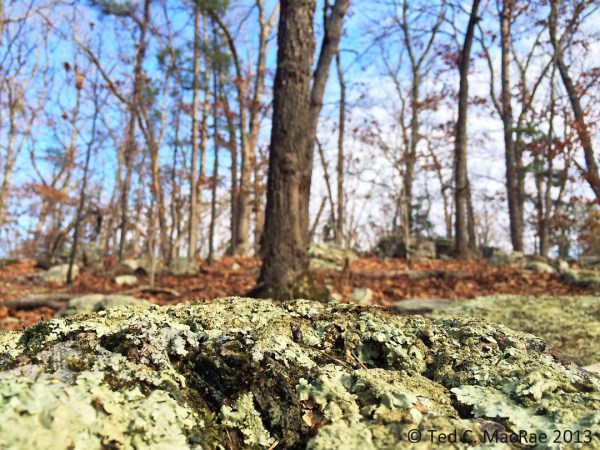
Close-up view of crustose lichens.

Close-up view of crustose lichens.

A semi- wide-angle macro photograph that combines a lichen encrusted rock in the foreground with forest and sky in the background. The camera will automatically focus on the background, so touch the screen at the top of the foreground object to set focus. It also helps to pan back a little bit to include more in the frame than is desired, then crop a little in Photoshop as the lower part of the foreground object will tend to be out of focus unless it is a perfectly vertical surface (rare). In this photo I cropped out about 1/5 from the bottom and a corresponding amount on each side to maintain original aspect ratio.

More dolomite exposures with crustose lichens.

More dolomite exposures with crustose lichens.

Highly dimensional foreground objects add depth and perspective to low-angle shots. Again, it is better to get a little more in the photo than desired and the crop slightly afterwards than to get too close and not be able to do anything about it. Taking the native shot a little further back also ensures that the entire foreground object is in focus.
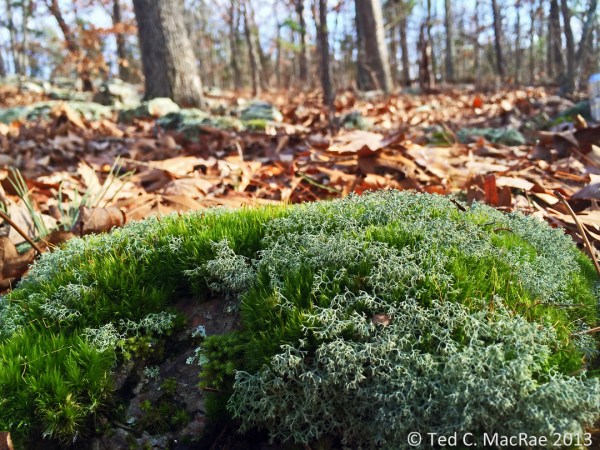
Fruticose lichens and moss intermingle in particularly moist spots.

Fruticose lichens and moss intermingle in particularly moist spots.

Like the close-up photo of the lichen-encrusted rock above, this photo of intermingled moss and fruticose lichens benefits from a low perspective with a high color contrast immediate background (fallen leaves) and blurred deep background (forest/sky) to add perspective. While the latter is not completely blurred, but it’s enough that it doesn’t detract from the main subject. The latter has maximal focus by backing up slightly for the shot and then cropping off the bottom out-of-focus portion in Photoshop. Again, I increased saturation a little more than usual to emphasize the value contrast.
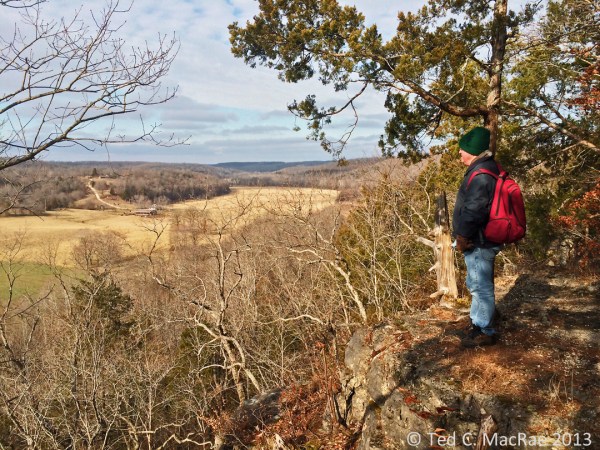
Friend and Ozark Trail co-conspirator Rich Thoma looks out over the Huzzah Creek Valley.

Friend and Ozark Trail co-conspirator Rich Thoma looks out over the Huzzah Creek Valley.

The main challenge with this photo was the shadow cast over Rich by the trees behind him. Setting the exposure on him resulted in a washed out sky, which I really wanted to preserve because of the textured clouds. I also wanted to include a good portion of the sky to give the sense of looking out over a far-below valley, so I set the exposure for the sky. The resulting photo had a good sky, but Rich was hidden in a darkly shadowed area. I used lighten shadows in Photoshop to brighten Rich and the shadowed area where he is standing, and I used aggressively increased saturation to make the many different shades of brown in the rest of the photo pop out.
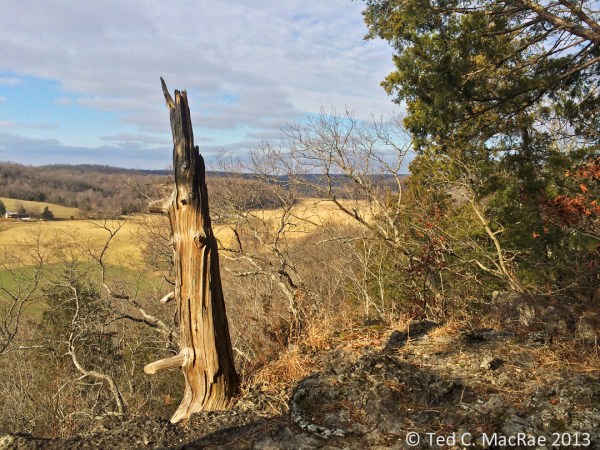
An ancient red-cedar snag hugs the bluff tops overlooking the Huzzah Creek Valley.

An ancient red-cedar snag hugs the bluff tops overlooking the Huzzah Creek Valley.

This photo had largely the same challenges and was dealt with in the same manner as the previous. The ancient red-cedar snag is an interesting and unusual subject, and I first tried a portrait orientation, but I decided I liked this landscape orientation better because of the ability to include living red-cedar to add a sense of time contrast.
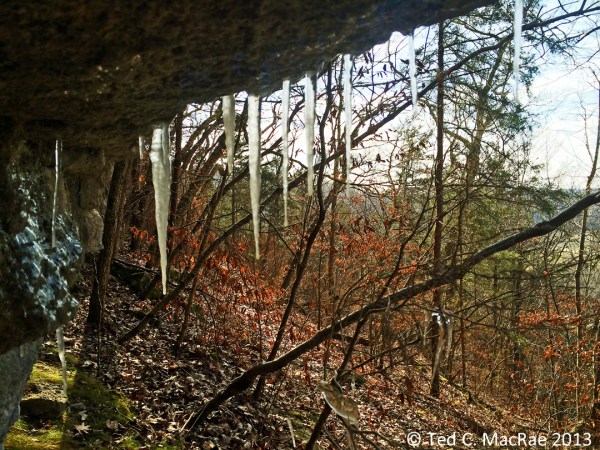
Icicles form on an undercut below the bluff top.

Icicles form on an undercut below the bluff top.

Whenever I find icicles hanging from a rock overhang, I like to provide a more unusual perspective by getting behind the icicles and looking out onto the landscape. It can be hard to get the camera to focus on the icicles rather than the distant landscape—just keep touching them on the screen until it works. I used shadow lightening in Photoshop to brighten the dark rock surfaces in the foreground.

A cap of resistant dolomite lines the top of the Huzzah Creek Valley.

A cap of resistant dolomite lines the top of the Huzzah Creek Valley.

This was a difficult photograph—sun on the pines/cedars on the left overexposed them, while shadows on the naturally dark rock bluff surfaces left them underexposed. This photo was made fairly acceptable by using both “darken highlights” and “lighten shadows” (careful—too aggressive with these features results in unnatural-looking photos), followed by brightening and increasing the contrast, and finally by increasing the saturation. It’s still not a great photo, but sometimes you get what you get.

More icicles.

More icicles.

This larger set of icicles was nicely positioned in front of an interestingly sloped landscape with the sun coming from the left. Again, I got behind them, kept touching the screen on the icicles until the iPhone focused on them, and then adjusted the white point setting in Levels in Photoshop to really make them pop against the rich browns of the landscape behind.

Icicles were especially abundant in this section of the bluff tops.

Icicles were especially abundant in this section of the bluff tops.

A fairly easy shot due to the direction of the sun that required no more than the usual amount of post-processing. Note the perspective, which was to have the rock feature begin right at the bottom left corner of the photograph with some sky above it.

Despite subfreezing air temperatures, sunlight causes water to drip from overhanging icicles, causing ice stalagmites on the ground beneath.

Despite subfreezing air temperatures, sunlight causes water to drip from overhanging icicles, causing ice stalagmites on the ground beneath.

This photo had some dark areas in the foreground that were cropped out, and to emphasize the ice I was more aggressive post-processing with brightening and increasing the contrast. Again, as with most photos with a lot of white in the subject, I adjusted the white point in Photoshop Levels to reduce the “dinginess” that seems natural for ambient light iPhone photos.

Icicles glisten in the frigid sunlight.

Icicles glisten in the frigid sunlight.

In this case, the sun glistening on the icicles and a deep recess behind them provided a natural contrast that I further emphasized in post-processing, along with brightening and setting white point. The icicles suffer from distortion due to my low angle (I’m not that tall!), which I tried to fix with Photoshop’s distort feature but wasn’t satisfied with the result.
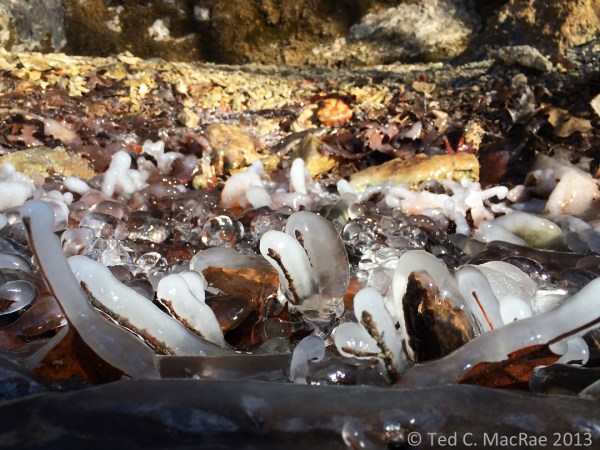
Close-up of ice stalagmites, revealing the twigs and petioles around which they have formed.

Close-up of ice stalagmites, revealing the twigs and petioles around which they have formed.

The approach with this photo was very much like that used for the close-ups of the lichen-encrusted rocks and intermingled lichens/moss photos—i.e., I backed up a bit to include more foreground than I wanted (which will be blurred at the bottom after setting the focus point on one of the stalagmites) and then cropped it out in post-processing. White subject = setting white point and using more aggressive brightening and contrast.
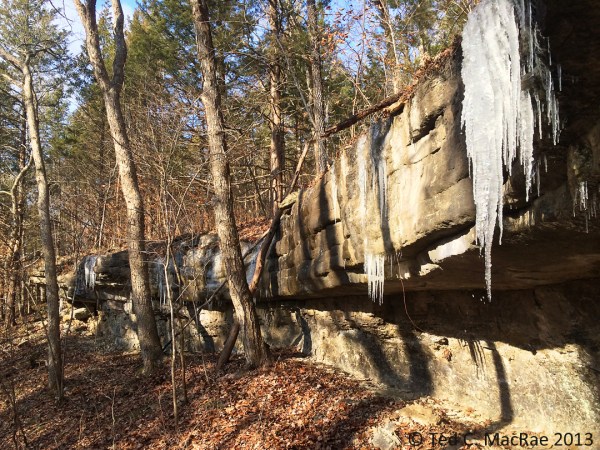
 Ted MacRae Yesterday ·  Rock, ice, and sunlight converge along the bluff tops


Rock, ice, and sunlight converge along the bluff tops

Again, the formation starts at the lower corner, and in this case the foreground (the right side) also contains an interesting clump of icicles. With the sun behind me, little was required to assure proper exposure, and only normal post-processing was required.

Moss with fruiting structures on a fallen log.

Moss with fruiting structures on a fallen log.

This moss on a fallen log was actually one of the more difficult photographs I took. I took the photo at an angle so that the background fruiting structures would form a solid, blurred red horizon to add depth, but in doing this the iPhone didn’t know where I wanted to focus and kept choosing the background. To force it to “choose” the foreground fruiting structures, I tilted the camera down so that only the foreground was in the frame, touched the screen on the fruiting structures in the back part of the screen to set focus where I wanted, then tilted the screen back again to include the background fruiting structures distant blurred background for perspective. One must shoot quickly when doing this or the iPhone will automatically readjust its focus to the background. I’ve tried shots such as this with the sky in the background, but in my experience the iPhone cannot focus on very thin foreground objects with the sky in the background, and the difference in brightness between the background and foreground is especially difficult to correct. Like the other semi- wide-angle macro shots above, I used the zoom feature (slightly), included a little more in the photo than I wanted, and then cropped out the overly blurred bottom portion of the photo.

Mushrooms on a fallen log.

Mushrooms on a fallen log.

Here is a typical photograph that someone might take of these large, saucer-sized mushrooms on a fallen log. In addition to being a pedestrian view of such a subject, it seems that iPhones sometimes have difficulty registering the correct color for photos taken straight down to the ground. This photo required quite a bit of color correction, and I’m still not overly satisfied with the result.
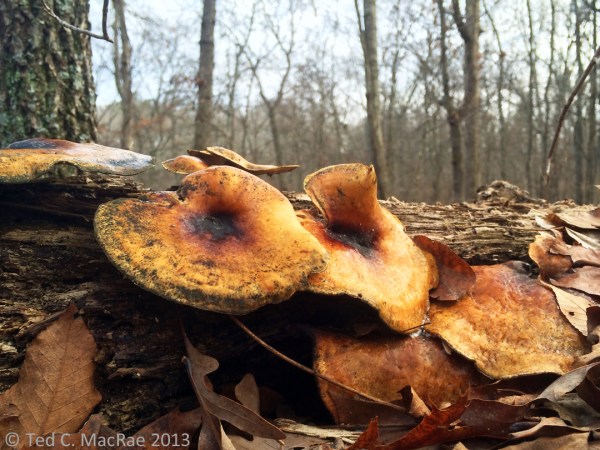
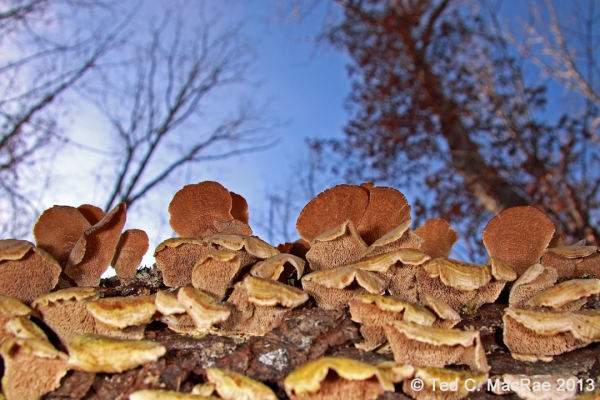
"Bug's eye" view of mushrooms on a fallen log.

“Bug’s eye” view of mushrooms on a fallen log.

As an alternative, I suggest getting low to photograph subjects such as this. The iPhone, with its lens against one edge and screen view, is well-adapted to take such low-angle photos, resulting in a much more interesting photo than the typical “looking down” perspective exemplified above. Inclusion of a little bit of sky in the background also provided some nice color contrast, made easier by shooting away from the sun, which was further emphasized in post-processing by increasing the saturation. As with the other semi- wide-angle macro photographs, a little bit of cropping along the bottom (but do keep the original aspect ratio) also benefited the photograph.

Moss covering the rock exposures in a delightful valley leading up from the Huzzah Creek Valley indicate an abundance of moisture.

Moss covering the rock exposures in a delightful valley leading up from the Huzzah Creek Valley indicate an abundance of moisture.

Last, but not least, this photograph of shaded, heavily moss-laden rock outcroppings bordering a small waterfall needed to be shot very dark in order to avoid “blowing” the sky in the background. Simply pointing and shooting into the shade will cause the iPhone to correctly expose the rocks, but the sky will be blown rather than retaining its blue color. Like the first two photos, I composed the image, then touched the screen on the sky to reduce the exposure. Again, this resulted in a photo that was very dark in the foreground, but this was easily corrected by aggressive brightening, adding contrast, and increasing the saturation post-processing to achieve a nice mix of browns and greens while preserving the blue sky background. In forest shots such as this with a lot of vertical objects, pay attention to distortion while composing the photo to avoid having trees at the edge of the photo “bowing” inwards at their tops. Sometimes this can be avoided by minor adjustments to the tilt of the iPhone while taking the shot, but if your position in the landscape is such that camera tilt alone is not enough to prevent this without losing the desired composition then go ahead and shoot the desired composition and use the “distortion” tool in Photoshop to correct the distortion this works best if bowing is minor).

I hope you have enjoyed this iPhone nature photography tutorial. If you have additional ideas or suggestions please let me know, and also I would be glad to hear of any related subjects you would like me to cover.

Copyright © Ted C. MacRae 2013