How to be an “iPhone nature photographer”

My passion for insect macro-photography is well known, so it may come as a surprise to learn that I have, during the past year or so, also become an avid “iPhone photographer”—i.e., I actually use my iPhone for “real” photography and not just selfies or quick snapshots. This is not to say that an iPhone can do everything that a digital SLR camera can do, especially when one considers the resolution of and wealth of lens options available for the latter. Nevertheless, as the world’s best selling smart phone, the iPhone has, by way of its camera function, also become the world’s best selling camera, and even though it cannot match the power of a dSLR, there are certain situations and types of photos for which the iPhone is perfectly adapted. Having gained some level of proficiency in learning what the iPhone can and cannot do when it comes to photography, I thought I would offer this photo set of a hike I did today along the Courtois Section of the Ozark Trail as a primer for the types of photos at which iPhones excel, along with some tips and tricks I’ve learned to get the most of the iPhone’s capabilities.

An iPhone is basically a fully automated, wide-angle camera (although the user can control exposure to some extent by touching the screen at the desired point). As such, it excels at landscape and general nature photos, and its small-diameter lens also allows some use for “wide-angle macro.” iPhones do not do well in low light situations or take true macro photographs (although one can use a variety of “clip-on” lenses to achieve fairly decent macro-photographs of larger insects—I have not tried this myself). As a result, I tend to use the iPhone mostly in good light situations and break out the big camera when the lighting is more challenging or if I want to take “real” macrophotographs. As with all digital photographs, good post-processing is necessary for making iPhone photos look their best, and in general a more aggressive approach than is typical for dSLR photographs will be required. The photos that follow are intended not only to give a flavor of the day’s hike, but also demonstrate my photographic approach and provide tips on composition, exposure, and post-processing. If you have gained experience in iPhone photography and have additional tips and tricks that you would like to share, I would greatly appreciate hearing about them in the comments.

Courtois Creek - immediately at the start we had to make a decision whether we could ford the creek. It was obviously too deep in most places, and we almost turned back, but then saw a path that looked like it might be passable. With air temps of 22F, we stripped off our pants, boots, and socks, packed them in our backpacks, and waded through frigid water that reached just below our hips before reaching the other side. Rich brought a towel, so we were able to dry off before getting dressed again. The whole process took almost a full half-hour.

Courtois Creek – immediately at the start we had to make a decision whether we could ford the creek. It was obviously too deep in most places, and we almost turned back, but then saw a path that looked like it might be passable. With air temps of 22F, we stripped off our pants, boots, and socks, packed them in our backpacks, and waded through frigid water that reached just below our hips before reaching the other side. Rich brought a towel, so we were able to dry off before getting dressed again. The whole process took almost a full half-hour.

This photo was taken into the sun, which can easily result in a washed out sky. To avoid this, I minimized the amount of sky in the photo (which also allowed the ripples in the foreground to be included for a sense of motion) and then touched the screen on the sky to set the exposure. This resulted in a dark photo, but it preserved the rich colors which could then be brought out with aggressive brightening and increasing the contrast in Photoshop. A standard set of commands that I generally use for all iPhone photos (slightly increased saturation, sharpening, and de-speckling) produced the finished version.

Bluffs along Courtois Creek - massive bluffs along the other side of the creek sported fallend boulders the size of dump trucks.

Bluffs along Courtois Creek – massive bluffs along the other side of the creek sported fallen boulders the size of dump trucks.

Another photo taken in the direction of the sun, causing the shadowed side of the rock to turn out very dark. Again I touched the screen on the sky to preserve the blue color and then aggressively lightened in Photoshop. Aggressive brightening generally requires a more aggressive increase in contrast, followed by the standard command set mentioned for the first photo.

We were feeling good about our decision to ford the creek as we hiked below spectacular bluffs.

We were feeling good about our decision to ford the creek as we hiked below spectacular bluffs.

This photo required fairly minimal post-processing since it was shot away from the sun and, thus, had decent native exposure. The bluff face was a little dark and needed minor brightening, but as always I set the exposure in the brightest area of the photo and then post-corrected the dark areas (this is much easier than the opposite, i.e., darkening areas that are too bright, as such areas are often blown and cannot be fixed).

Ozark Trail blaze.

Ozark Trail blaze.

A very close-up shot of a trail blaze. The main watch out with such photos is to ensure the plane of the camera matches the subject precisely, otherwise distortion will cause elongation of one side (making the blaze a trapezoid rather than a rectangle). In post-processing I set the white point in levels by greatly magnifying the image and clicking on a very white part of the blaze to get a more natural looking white rather than the dirty gray that often results when shooting largely white subjects.

Blufftop view of Courtois Creek - from a vantage point several hundred feet above the creek we could look down on our crossing point. I have a fear of heights but nevertheless hung onto the treefall in front of me to inch out for a clear view.

Blufftop view of Courtois Creek – from a vantage point several hundred feet above the creek we could look down on our crossing point. I have a fear of heights but nevertheless hung onto the tree fall in front of me to inch out for a clear view.

This was another photo taken fairly towards the sun. I wanted just a thin band of sky to add a sense of scale to the downward-looking view, but with little sky the camera automatically wanted to expose for the darker foreground, thus blowing the sky. To prevent this, I tilted the camera up slightly to get more sky, touched the screen on the sky to set exposure, then tilted back down to the composition I wanted and took the shot. Post-processing involved aggressive brightening as described for the first two photos above.

Sapsucker damage on an old tree.

Sapsucker damage on an old tree.

I approached this tree from an angle facing the sun, so I simply waited until we passed it and could turn to place the sun behind me while shooting this tree. The trick is to get the right distance for a composition that doesn’t include too much wasted space at the foot of the tree or in its canopy, so this requires some walking back and forth until the right composition is achieved (I do not use the zoom function on the camera unless I have to because of the loss of resolution).

Close-up view of sapsucker damage. Obviously they have been using this tree for many years

Close-up view of sapsucker damage. Obviously they have been using this tree for many years

A closer view of the sapsucker damage—again this is mostly a compositional challenge, which I met by getting close enough to have this interesting “looking up” perspective but still far enough away to include the lowest ring of damage at the bottom of the photo and the highest at the top. Little post-processing other than the standard set was required for this sun-behind-me photograph.

Crystallifolia forms when water drawn from the soil by certain plants oozes out of the stem and contacts frigid air. Additional water pushes out the ice, then freezes itself, resulting in long, thin ribbons of ice that curl around themselves

Crystallofolia forms when water drawn from the soil by certain plants oozes out of the stem and contacts frigid air. Additional water pushes out the ice, then freezes itself, resulting in long, thin ribbons of ice that curl around themselves

For photographing crystallofolia and other small, ground-dwelling features, I like to turn the iPhone so that the lens is on the bottom edge to achieve a true ground-level perspective. The macro capabilities of the iPhone are limited, so in this case I used the zoom function (maybe about 1/3 to full zoom), centered the feature in the photo to get the best exposure and focus, and then did a little more cropping post-processing at the bottom of the photo to minimize the amount of blurred foreground. Again, a mostly white subject such as this tends to come out dull in the native photograph, so I enlarged the image greatly in Photoshop, opened Levels, clicked on set white point, and then clicked on the whitest portion of the subject that I could find to achieve a more ‘naturally’ white subject. It can take a few tries to find a spot in the image that doesn’t result in unnatural over-whitening of the subject—one must play around a bit to find it.

Crustose lichens abound on the dolomite bedrock exposures along the "Narrows" - a long, narrow ridge between the Courtois and Huzzah Creek Valleys.

Crustose lichens abound on the dolomite bedrock exposures along the “Narrows” – a long, narrow ridge between the Courtois and Huzzah Creek Valleys.

Again, I like to use a low perspective for ground features such as these lichen-encrusted rocks strewn across the forest floor. If you let the iPhone focus naturally, it tends to focus on subjects closer to the middle of the photo, so be sure to touch the screen on the foremost subject to set the focus in the foreground. Photos with contrasting colors such as the greens, browns, and blues in this one generally benefit from a little more aggressive increase in saturation (maybe 15-20%) than I normally use for iPhone photos (usually 5-10%).

Close-up view of crustose lichens.

Close-up view of crustose lichens.

A semi- wide-angle macro photograph that combines a lichen encrusted rock in the foreground with forest and sky in the background. The camera will automatically focus on the background, so touch the screen at the top of the foreground object to set focus. It also helps to pan back a little bit to include more in the frame than is desired, then crop a little in Photoshop as the lower part of the foreground object will tend to be out of focus unless it is a perfectly vertical surface (rare). In this photo I cropped out about 1/5 from the bottom and a corresponding amount on each side to maintain original aspect ratio.

More dolomite exposures with crustose lichens.

More dolomite exposures with crustose lichens.

Highly dimensional foreground objects add depth and perspective to low-angle shots. Again, it is better to get a little more in the photo than desired and the crop slightly afterwards than to get too close and not be able to do anything about it. Taking the native shot a little further back also ensures that the entire foreground object is in focus.

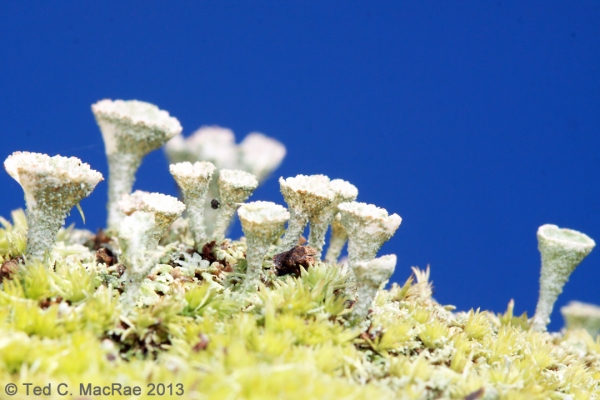
Fruticose lichens and moss intermingle in particularly moist spots.

Fruticose lichens and moss intermingle in particularly moist spots.

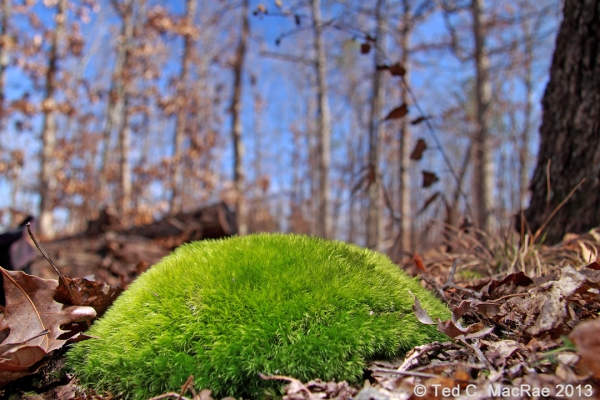
Like the close-up photo of the lichen-encrusted rock above, this photo of intermingled moss and fruticose lichens benefits from a low perspective with a high color contrast immediate background (fallen leaves) and blurred deep background (forest/sky) to add perspective. While the latter is not completely blurred, but it’s enough that it doesn’t detract from the main subject. The latter has maximal focus by backing up slightly for the shot and then cropping off the bottom out-of-focus portion in Photoshop. Again, I increased saturation a little more than usual to emphasize the value contrast.

Friend and Ozark Trail co-conspirator Rich Thoma looks out over the Huzzah Creek Valley.

Friend and Ozark Trail co-conspirator Rich Thoma looks out over the Huzzah Creek Valley.

The main challenge with this photo was the shadow cast over Rich by the trees behind him. Setting the exposure on him resulted in a washed out sky, which I really wanted to preserve because of the textured clouds. I also wanted to include a good portion of the sky to give the sense of looking out over a far-below valley, so I set the exposure for the sky. The resulting photo had a good sky, but Rich was hidden in a darkly shadowed area. I used lighten shadows in Photoshop to brighten Rich and the shadowed area where he is standing, and I used aggressively increased saturation to make the many different shades of brown in the rest of the photo pop out.

An ancient red-cedar snag hugs the bluff tops overlooking the Huzzah Creek Valley.

An ancient red-cedar snag hugs the bluff tops overlooking the Huzzah Creek Valley.

This photo had largely the same challenges and was dealt with in the same manner as the previous. The ancient red-cedar snag is an interesting and unusual subject, and I first tried a portrait orientation, but I decided I liked this landscape orientation better because of the ability to include living red-cedar to add a sense of time contrast.

Icicles form on an undercut below the bluff top.

Icicles form on an undercut below the bluff top.

Whenever I find icicles hanging from a rock overhang, I like to provide a more unusual perspective by getting behind the icicles and looking out onto the landscape. It can be hard to get the camera to focus on the icicles rather than the distant landscape—just keep touching them on the screen until it works. I used shadow lightening in Photoshop to brighten the dark rock surfaces in the foreground.

A cap of resistant dolomite lines the top of the Huzzah Creek Valley.

A cap of resistant dolomite lines the top of the Huzzah Creek Valley.

This was a difficult photograph—sun on the pines/cedars on the left overexposed them, while shadows on the naturally dark rock bluff surfaces left them underexposed. This photo was made fairly acceptable by using both “darken highlights” and “lighten shadows” (careful—too aggressive with these features results in unnatural-looking photos), followed by brightening and increasing the contrast, and finally by increasing the saturation. It’s still not a great photo, but sometimes you get what you get.

More icicles.

More icicles.

This larger set of icicles was nicely positioned in front of an interestingly sloped landscape with the sun coming from the left. Again, I got behind them, kept touching the screen on the icicles until the iPhone focused on them, and then adjusted the white point setting in Levels in Photoshop to really make them pop against the rich browns of the landscape behind.

Icicles were especially abundant in this section of the bluff tops.

Icicles were especially abundant in this section of the bluff tops.

A fairly easy shot due to the direction of the sun that required no more than the usual amount of post-processing. Note the perspective, which was to have the rock feature begin right at the bottom left corner of the photograph with some sky above it.

Despite subfreezing air temperatures, sunlight causes water to drip from overhanging icicles, causing ice stalagmites on the ground beneath.

Despite subfreezing air temperatures, sunlight causes water to drip from overhanging icicles, causing ice stalagmites on the ground beneath.

This photo had some dark areas in the foreground that were cropped out, and to emphasize the ice I was more aggressive post-processing with brightening and increasing the contrast. Again, as with most photos with a lot of white in the subject, I adjusted the white point in Photoshop Levels to reduce the “dinginess” that seems natural for ambient light iPhone photos.

Icicles glisten in the frigid sunlight.

Icicles glisten in the frigid sunlight.

In this case, the sun glistening on the icicles and a deep recess behind them provided a natural contrast that I further emphasized in post-processing, along with brightening and setting white point. The icicles suffer from distortion due to my low angle (I’m not that tall!), which I tried to fix with Photoshop’s distort feature but wasn’t satisfied with the result.

Close-up of ice stalagmites, revealing the twigs and petioles around which they have formed.

Close-up of ice stalagmites, revealing the twigs and petioles around which they have formed.

The approach with this photo was very much like that used for the close-ups of the lichen-encrusted rocks and intermingled lichens/moss photos—i.e., I backed up a bit to include more foreground than I wanted (which will be blurred at the bottom after setting the focus point on one of the stalagmites) and then cropped it out in post-processing. White subject = setting white point and using more aggressive brightening and contrast.

 Ted MacRae Yesterday ·  Rock, ice, and sunlight converge along the bluff tops


Rock, ice, and sunlight converge along the bluff tops

Again, the formation starts at the lower corner, and in this case the foreground (the right side) also contains an interesting clump of icicles. With the sun behind me, little was required to assure proper exposure, and only normal post-processing was required.

Moss with fruiting structures on a fallen log.

Moss with fruiting structures on a fallen log.

This moss on a fallen log was actually one of the more difficult photographs I took. I took the photo at an angle so that the background fruiting structures would form a solid, blurred red horizon to add depth, but in doing this the iPhone didn’t know where I wanted to focus and kept choosing the background. To force it to “choose” the foreground fruiting structures, I tilted the camera down so that only the foreground was in the frame, touched the screen on the fruiting structures in the back part of the screen to set focus where I wanted, then tilted the screen back again to include the background fruiting structures distant blurred background for perspective. One must shoot quickly when doing this or the iPhone will automatically readjust its focus to the background. I’ve tried shots such as this with the sky in the background, but in my experience the iPhone cannot focus on very thin foreground objects with the sky in the background, and the difference in brightness between the background and foreground is especially difficult to correct. Like the other semi- wide-angle macro shots above, I used the zoom feature (slightly), included a little more in the photo than I wanted, and then cropped out the overly blurred bottom portion of the photo.

Mushrooms on a fallen log.

Mushrooms on a fallen log.

Here is a typical photograph that someone might take of these large, saucer-sized mushrooms on a fallen log. In addition to being a pedestrian view of such a subject, it seems that iPhones sometimes have difficulty registering the correct color for photos taken straight down to the ground. This photo required quite a bit of color correction, and I’m still not overly satisfied with the result.

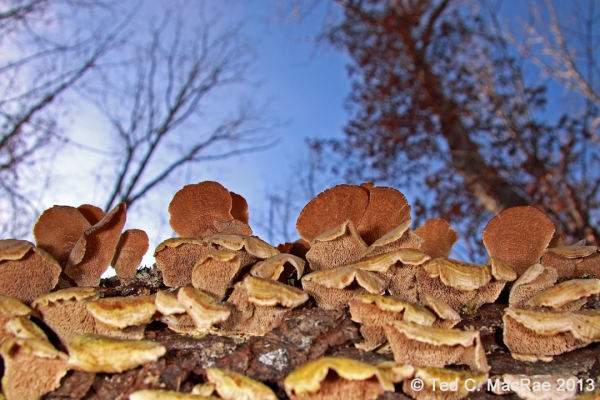
"Bug's eye" view of mushrooms on a fallen log.

“Bug’s eye” view of mushrooms on a fallen log.

As an alternative, I suggest getting low to photograph subjects such as this. The iPhone, with its lens against one edge and screen view, is well-adapted to take such low-angle photos, resulting in a much more interesting photo than the typical “looking down” perspective exemplified above. Inclusion of a little bit of sky in the background also provided some nice color contrast, made easier by shooting away from the sun, which was further emphasized in post-processing by increasing the saturation. As with the other semi- wide-angle macro photographs, a little bit of cropping along the bottom (but do keep the original aspect ratio) also benefited the photograph.

Moss covering the rock exposures in a delightful valley leading up from the Huzzah Creek Valley indicate an abundance of moisture.

Moss covering the rock exposures in a delightful valley leading up from the Huzzah Creek Valley indicate an abundance of moisture.

Last, but not least, this photograph of shaded, heavily moss-laden rock outcroppings bordering a small waterfall needed to be shot very dark in order to avoid “blowing” the sky in the background. Simply pointing and shooting into the shade will cause the iPhone to correctly expose the rocks, but the sky will be blown rather than retaining its blue color. Like the first two photos, I composed the image, then touched the screen on the sky to reduce the exposure. Again, this resulted in a photo that was very dark in the foreground, but this was easily corrected by aggressive brightening, adding contrast, and increasing the saturation post-processing to achieve a nice mix of browns and greens while preserving the blue sky background. In forest shots such as this with a lot of vertical objects, pay attention to distortion while composing the photo to avoid having trees at the edge of the photo “bowing” inwards at their tops. Sometimes this can be avoided by minor adjustments to the tilt of the iPhone while taking the shot, but if your position in the landscape is such that camera tilt alone is not enough to prevent this without losing the desired composition then go ahead and shoot the desired composition and use the “distortion” tool in Photoshop to correct the distortion this works best if bowing is minor).

I hope you have enjoyed this iPhone nature photography tutorial. If you have additional ideas or suggestions please let me know, and also I would be glad to hear of any related subjects you would like me to cover.

Copyright © Ted C. MacRae 2013

A winter longhorned beetle

According to the calendar it’s still autumn; however, in practical terms winter has settled in across much of the U.S. For those of us who study wood-boring beetles in the families Buprestidae (jewel beetles) and Cerambycidae (longhorned beetles), our time for collecting ended long ago. Adults of most species are active in spring and early summer, although some species don’t really make their appearance until summer is in full swing and a few rather distinctive species in genera such as Crossidius and Megacyllene make their appearance exclusively during fall. There is one longhorned beetle, however, that can actually be encountered in its greatest numbers during the dead of winter—Rhagium inquisitor, or the “ribbed pine borer.”

Rhagium inquisitor | Reynolds Co., Missouri

Rhagium inquisitor overwintering adult | Reynolds Co., Missouri

Rhagium inquisitor is unique among North American cerambycids in several respects. Most species in the family overwinter as mature or immature larvae, the former triggered to pupation by the first warm days of late winter and early spring in preparation for emergence as adults a few weeks later. Rhagium inquisitor, on the other hand, pupates during late summer and fall and then transforms to the adult before winter sets in (Linsley & Chemsak 1972), passing the winter in this stage and emerging during the earliest days of spring. Also unique among North American cerambycids is the place of pupation—directly under the bark. This contrasts with most other species, which either feed and pupate within the sapwood or feed under the bark but then bore into the sapwood for pupation. The species breeds exclusively in the trunks of dead conifers, with pines (Pinus spp.) especially favored, and as a result one can easily encounter the adults by peeling back the bark of dead pines during winter. Pupation takes place within distinctive rings of frass and coarse, fibrous wood shavings, prepared by the larva prior to pupation, so even when adults and larvae are not present the occurrence of this species can be determined by the occurrence of their pupation rings.

Adults overwinter in cells lined with frass and fibrous wood shavings.

Adults overwinter in cells lined with frass and fibrous wood shavings.

Not only are the overwintering and pupation habits of this species unique, but the adults themselves are distinctive from all other North American cerambycids (Yanega 1996) in their appearance—”big-shouldered” build, heavily “ribbed” elytra, and unusually short antennae (that are anything but “longhorned”). Lastly, the species is distributed not only in the boreal forests of North America, but Europe and Asia as well. The species is extremely variable in size and sculpturing, which combined with its Holarctic distribution has led to an unusually high number of synonyms. In fact, much of the North American literature prior to Linsley & Chemsak (1972) concluding that the North American and Eurasian forms represented the same species refers to this species as R. lineatum.

REFERENCES:

Linsely, E. G. & J. A. Chemsak. 1972. Cerambycidae of North America, Part VI, No. 1. Taxonomy and classification of the subfamily Lepturinae. University of California Publications in Entomology 69:viii + 1–138, 2 plates.

Yanega, D. 1996. Field Guide to Northeastern Longhorned Beetles (Coleoptera: Cerambycidae). Illinois Natural History Survey Manual 6: x + 1–174 [preview].

Copyright © Ted C. MacRae 2013

Sunday scarab: Phileurus valgus

Phileurus valgus (Linnaeus) | Otter Slough Conservation Area, Stoddard Co., Missouri

Phileurus valgus (Linnaeus) | Otter Slough Conservation Area, Stoddard Co., Missouri

Few beetles enjoy more popularity than the scarabs (family Scarabaeidae)¹, and within that group certainly the members of the subfamily Dynastinae are the most popular of all due to their often enormous size and presence of highly developed horns on the head and pronotum. The largest beetles in the U.S. (at least, by weight)—the Hercules beetles, genus Dynastes—belong to this subfamily, and in the tropical regions of the New World members of the genus Megasoma (literally meaning “giant body”) are among the heaviest-bodied beetles in the world (ironically, the title spot goes to members of the genus Goliathus in the subfamily Cetoniinae). Of course, almost without exception in the insect world exceptions apply, and not all dynastine scarabs are large, heavy-bodied beetles. In fact, members of the genus Cyclocephala are often mistaken for May beetles (subfamily Melolonthinae), while members of the genus represented by the species featured in this post—Phileurus—are sometimes mistaken for smallish “bess beetles” (Odontotaenius disjunctus) in the family Passalidae due to their flattened and parallel-sided body.

¹ Except maybe tiger beetles, jewel beetles, and longhorned beetles (wink!).

This species resembles and is sometimes mistaken for the common "bess bug."

This species resembles and is sometimes mistaken for the common “bess bug.”

Phileurus is a primarily Neotropical genus, with only two species ranging north into the United States and one, P. valgus, occurring broadly in the eastern United States. Despite its broad distribution, P. valgus seems to be more common in the southern part of the country and has been recorded under bark of decaying wood and attracted to lights. Saylor (1948) notes that Richter reared a specimen from a larvae collected in a cavity of a dead basswood (Tilia sp.) tree, and adults have also been reared from larvae collected in a blackjack oak (Quercus marilandica) snag (Taber & Fleenor 2005). The individual featured here was one of several that I found under the lower trunk bark of a large, standing, dead pin oak (Q. palustris) tree growing in a wet, bottomland forest in the Mississippi Alluvial Plain of extreme southeastern Missouri. I have seen this species from time to time over the years—never abundantly—but these are the first that I have seen in a situation other than being attracted to lights. The bark was quite loose and covered wood that was soft and well-decayed, and three adults were found embedded within a granular frass-filled gallery directly beneath the bark. One can presume that larvae could also have been found within the wood had I done a little digging.

The head of this species is adorned with three small cephalic tubercles.

The head of this species is adorned with three small cephalic and one pronotal tubercles.

Taber & Fleenor (2005) also note that adults of this species possess structures known to be used by other beetles for sound production, but they did not say whether they have heard this beetle making sounds. I have never heard sounds from these beetles when handling them, either. This contrasts with true bess beetles, which stridulate to make a “kissing” sound when handled.

REFERENCES:

Saylor, L. W. 1948. Synoptic revision of the United States scarab beetles of the subfamily Dynastinae, No. 4: Tribes Oryctini (part), Dynastini, and Phileurini. Journal of the Washington Academy of Sciences 38(5):176–183.

Taber, S. W. & S. B. Fleenor. 2005. Invertebrates of Central Texas Wetlands. Texas Tech University Press, Lubbock, 322 pp. [preview].

Copyright © Ted C. MacRae 2013

One-shot Wednesday: The “other” hibiscus jewel beetle

Paragrilus tenuis | Stoddard Co., Missouri

Paragrilus tenuis (LeConte) | Stoddard Co., Missouri

This past summer I visited Otter Slough Conservation Area in southeast Missouri in an effort to find and photograph the stunningly beautiful Agrilus concinnus Horn, or “hibiscus jewel beetle” (MacRae 2004). I was not successful in that quest, but I did manage to snap a single photo of another jewel beetle also associated exclusively with hibiscus, Paragrilus tenuis (LeConte). This species belongs to a much smaller genus of mostly Neotropical jewel beetles that resemble the related and much more speciose genus Agrilus but differ significantly by their antennae being received in grooves along the sides of the pronotum and, for the most part, their association as larvae with stems of living, herbaceous plants rather than dead branches and twigs of deciduous trees. Only four species of Paragrilus occur in the U.S. (Hespenheide 2002), and of these only Ptenuis is known to occur in the eastern U.S. where it has been reported breeding in Hibiscus moscheutos (including ssp. lasiocarpos). I have also collected adults on H. laevis (MacRae 2006), but to my knowledge it has not yet been reared from that plant.

These tiny little beetles (~ 5 mm in length) are normally seen resting on the terminal leaves of their host plants, but they are extremely wary and quick to take flight. As a result, photographing them in situ with a short macro lens in the heat of the day is rather challenging, especially when they are not numerous. I only saw perhaps half a dozen individuals during the visit, and the photo shown here represents the only shot that I even managed to fire off. While I would have liked to have gotten a dorsal view of the beetle, this single shot is nevertheless well-focused and a rather interesting composition.

REFERENCES:

Hespenheide, H. A. 2002. A review of North and Central American Paragrilus Saunders, 1871 (Coleoptera: Buprestidae: Agrilinae). Zootaxa 43:1–28 [pdf].

MacRae, T. C. 2004. Beetle bits: Hunting the elusive “hibiscus jewel beetle”. Nature Notes, Journal of the Webster Groves Nature Study Society 76(5):4–5 [pdf].

MacRae, T. C. 2006. Distributional and biological notes on North American Buprestidae (Coleoptera), with comments on variation in Anthaxia (Haplanthaxiaviridicornis (Say) and A. (H.) viridfrons Gory. The Pan-Pacific Entomologist 82(2):166–199 [pdf].

Copyright © Ted C. MacRae 2013

The Festive Tiger Beetle in Southeast Missouri

Cicindela scutellaris lecontei x s. unicolor

Cicindela scutellaris lecontei x scutellaris unicolor (male) | Holly Ridge Conservation Area, Missouri

This past spring I returned to the lowlands of southeastern Missouri in an effort to find and photograph a population of tiger beetles that seems to be unique to the area. The beetles represent Cicindela scutellaris (Festive Tiger Beetle), a widespread species that is common in dry sand habitats across the central and eastern U.S. It is also one of North America’s most polytopic species, with populations in the Great Plains, eastern U.S., Atlantic Coast, southeastern Coastal Plain, and several isolated populations on the western and southwestern peripheries of the species’ range of distribution recognized as distinct subspecies. In Missouri the species is known only from the extreme northwestern, northeastern, and southeastern corners of the state. In all of these areas the populations are found on alluvial sand deposits associated with the Missouri and Mississippi Rivers. Additional sand deposits are found in the areas between these three widely disjunct areas, but curiously the species has not yet been found in them, despite the presence of other species that occupy these same habitats such as Cicindela formosa (Big Sand Tiger Beetle).

Cicindela scutellaris lecontei x s. unicolor

Cicindela scutellaris lecontei x scutellaris unicolor (male) | Holly Ridge Conservation Area, Missouri

The populations in northern Missouri fall well within the distributional range of subspecies C. s. lecontei and are readily assignable to that taxon based on their wine-red coloration and well developed elytral markings. The population in southeastern Missouri, however, cannot be assigned either to that subspecies or to the more southern subspecies C. s. unicolor, which occurs along the southeastern U.S. Coastal Plain and is characterized by solid green coloration and no elytral markings. Individuals from southeastern Missouri are typically green, as in C. s. unicolor, but usually exhibit a distinct wine overtone from C. s. lecontei that varies greatly in its degree of development. Like C. s. lecontei, the elytra are usually marked, but never as strongly as in C. s. lecontei and sometimes not at all (as in C. s. unicolor). The two individuals shown in these photos represent the typical condition—wine blushing and elytral markings only moderately developed; however, more extreme examples can be seen in photos from fall 2008 and spring 2009 (taken during my “point-and-shoot” days, which explains my desire to photograph these beetles again). The intergradation of characters, their variable development, and the apparent presence of a wide disjunction zone between this population and C. s. lecontei to the north suggest to me that it originated from a relatively recent hybridization event between C. s. lecontei and C. s. unicolor—perhaps during the post-glacial hypsithermal that ended some 5,000 years ago.

Cicindela scutellaris lecontei x s. unicolor

Cicindela scutellaris lecontei x scutellaris unicolor (female) | Sand Prairie Conservation Area, Missouri

While I am happier with these photos than I am with those taken earlier, they don’t represent either the full range of variability seen in the population or the most aesthetically pleasing tiger beetle photographs I’ve ever taken. I made two trips to the southeast this past spring, and on each trip I was successful in finding and photographing only a single, very skittish individual—one on a sandy trail through upland forest (Holly Ridge Conservation Area) and the other along the margin of a sand blowout in a native sand prairie remnant (Sand Prairie Conservation Area). I’ll try again this coming spring and hopefully will be able to show some better photographs.

p.s. Can you tell the difference in the type of flash diffuser I used between these two trips? If so, which one do you like better?

Copyright © Ted C. MacRae 2013

INHS Seminar: Tiger Beetles of Missouri

If you are in the Champaign, Illinois area on Tuesday, 29 October 2013, I will be giving a seminar as part of the Illinois Natural History Survey Fall 2013 Seminar Series. I hope to see you there!

My thanks to Dr. Sam Heads for extending to me the invitation and to Jennifer Mui for preparing the very nice poster and attending to travel details.

INHS-Seminar-MacRae_2013-10-29
Copyright © Ted C. MacRae 2013

Sunday Spider: Backlit Araneus

Araneus sp. | Wildwood, St. Louis Co., Missouri

Araneus sp. | Wildwood, St. Louis Co., Missouri

Letting the dog out tonight, I encountered this spider—presumably in the genus Araneus—who had strung up her web in the corner of the doorway and was eerily backlit when I turned on the porch light. Without a tripod that would allow me to position the camera about 7′ above the floor and make use of a super long exposure, my only option for capturing the scene hand-held was to crank the ISO all the way up to 3200, ratchet down the shutter speed to 1/20th sec, and open up the aperture to f/5.6 (any lower and the shallow depth of field would have been unacceptable). Heavy-handed processing to reduce noise and increase sharpness yielded a serviceable photo; however, I’ve been thinking about getting a tripod lately, and the chance to produce much better versions of scenes like this only strengthen those thoughts.

Copyright © Ted C. MacRae 2013

Observation and Bias in Biology

The following is a guest post by my friend Kent Fothergill. Read more of Kent’s musings at his blog, biologistsoup.


Observation is a key activity in scientific inquiry. People who work with insects can make many interesting observations from collected insects: distribution, phenology, etc. Observations can be documented and analyzed later from photographs. A collection of photographs can also yield information about: associations with other species, behavior, while providing the same information as collected specimens – as such photography is a new tool changing entomology. Of course, most observations are made using only human senses without photographic or specimen documentation, but all observations can be subject to biases.

Observer biases are our evolutionary legacy. Our brains evolved to process and interpret data based on patterns observed in previously processed data. Because of the vast amount of data flowing in from our five senses and our limited ability to focus on data, our brains let most data be background. Even the subset of data that we focus our attention on is filtered, who hasn’t taken a photograph and found something much more interesting in the photograph than the original subject (e.g., these mites on harvestmen)? All data, even the data subset we are focused on can be misinterpreted. When teaching scientific methods, my students always enjoyed the optical illusion exercises to demonstrate why objective analyses and accurate measurement are important.

Remember, that the brain also compares incoming data to previous data. This allows pattern recognition. Recently, Ted and I were blacklighting along the Mississippi River in Southeast Missouri. We found a pair of Elaphidion mucronatum (spiny oak borer) a very common insect in Southeast Missouri. So common that many would move on to other more interesting subjects at that point. The insects were in a mate guarding situation.  Because I had a name for the behavior, my brain put my observation in the mate guarding category. At this point I would have moved on, except Ted wished to document the subject with his camera rig, which meant I would do what any friend should: watch the insects while Ted ran to vehicle to get his camera so he would be able to photograph them. While Ted was gone things got interesting. The male was positioned above the female, who was more or less caged between his legs. The pair was moving in unison on the tree trunk with very little actual contact between the pair. This was interesting, but when the female E. mucronatum suddenly shot out from under the male ending up 10’ vertical below him on the side of the tree trunk I was stunned. The male covered this distance with amazing speed and recaptured the female. After a couple minutes the female again shot out from under went down a few feet and doubled back ending out of sight above the male. At this point the male remained motionless for a brief period. When Ted came back with his camera, I took my eyes off of the male to tell him about what I had seen, and the male had vacated the area. Later, on the very same tree, we saw a mate guarding pair (presumably the same individuals) coming down towards us.

I have viewed many mate guarding insects. Mate guarding is a male insect using its body to prevent other males from mating with this female. Evolutionary biologists will explain mate guarding behavior in terms of enhanced male reproductive success, and that is why mate guarding persists. I never questioned this explanation, but should have. The E. mucronatum observation caused me to see mate guarding in a new way and realize that mate guarding involves a male and female component – I know this seems obvious, but I had my own cultural bias to overcome in this regard. I had never considered that mate guarding could involve non-willing females.

Based on a 10 minute observation of a very common insect my new understanding of mate guarding now recognizes that mate guarding influences female fitness also. Mate guarding persists when it creates a change in fitness in the male and female such that there is a positive net change in fitness for reproductive output for all individuals involved. In the case I witnessed, there may actually be a reproductive cost for the female and that is why she tried to avoid/escape the mate guarding. I have much more to learn about mate guarding.

Science is a way of objectively seeing the world and testing what you have seen to approach truth. This observation of E. mucronatum was also a mirror that showed my cultural bias and how that bias influenced my interpretation of my observations. For me, this observation could be a watershed event.

The moral(s) of this story:

  1. Life is short: enjoy time in the field with friends.
  2. Pay attention. There are new and wonderful things to observe even in the common and mundane.
  3. Be aware of the biases that can keep you from the truth.
  4. Have fun out there!

Copyright © Kent Fothergill 2013