How to be an “iPhone nature photographer”

My passion for insect macro-photography is well known, so it may come as a surprise to learn that I have, during the past year or so, also become an avid “iPhone photographer”—i.e., I actually use my iPhone for “real” photography and not just selfies or quick snapshots. This is not to say that an iPhone can do everything that a digital SLR camera can do, especially when one considers the resolution of and wealth of lens options available for the latter. Nevertheless, as the world’s best selling smart phone, the iPhone has, by way of its camera function, also become the world’s best selling camera, and even though it cannot match the power of a dSLR, there are certain situations and types of photos for which the iPhone is perfectly adapted. Having gained some level of proficiency in learning what the iPhone can and cannot do when it comes to photography, I thought I would offer this photo set of a hike I did today along the Courtois Section of the Ozark Trail as a primer for the types of photos at which iPhones excel, along with some tips and tricks I’ve learned to get the most of the iPhone’s capabilities.

An iPhone is basically a fully automated, wide-angle camera (although the user can control exposure to some extent by touching the screen at the desired point). As such, it excels at landscape and general nature photos, and its small-diameter lens also allows some use for “wide-angle macro.” iPhones do not do well in low light situations or take true macro photographs (although one can use a variety of “clip-on” lenses to achieve fairly decent macro-photographs of larger insects—I have not tried this myself). As a result, I tend to use the iPhone mostly in good light situations and break out the big camera when the lighting is more challenging or if I want to take “real” macrophotographs. As with all digital photographs, good post-processing is necessary for making iPhone photos look their best, and in general a more aggressive approach than is typical for dSLR photographs will be required. The photos that follow are intended not only to give a flavor of the day’s hike, but also demonstrate my photographic approach and provide tips on composition, exposure, and post-processing. If you have gained experience in iPhone photography and have additional tips and tricks that you would like to share, I would greatly appreciate hearing about them in the comments.

Courtois Creek - immediately at the start we had to make a decision whether we could ford the creek. It was obviously too deep in most places, and we almost turned back, but then saw a path that looked like it might be passable. With air temps of 22F, we stripped off our pants, boots, and socks, packed them in our backpacks, and waded through frigid water that reached just below our hips before reaching the other side. Rich brought a towel, so we were able to dry off before getting dressed again. The whole process took almost a full half-hour.

Courtois Creek – immediately at the start we had to make a decision whether we could ford the creek. It was obviously too deep in most places, and we almost turned back, but then saw a path that looked like it might be passable. With air temps of 22F, we stripped off our pants, boots, and socks, packed them in our backpacks, and waded through frigid water that reached just below our hips before reaching the other side. Rich brought a towel, so we were able to dry off before getting dressed again. The whole process took almost a full half-hour.

This photo was taken into the sun, which can easily result in a washed out sky. To avoid this, I minimized the amount of sky in the photo (which also allowed the ripples in the foreground to be included for a sense of motion) and then touched the screen on the sky to set the exposure. This resulted in a dark photo, but it preserved the rich colors which could then be brought out with aggressive brightening and increasing the contrast in Photoshop. A standard set of commands that I generally use for all iPhone photos (slightly increased saturation, sharpening, and de-speckling) produced the finished version.

Bluffs along Courtois Creek - massive bluffs along the other side of the creek sported fallend boulders the size of dump trucks.

Bluffs along Courtois Creek – massive bluffs along the other side of the creek sported fallen boulders the size of dump trucks.

Another photo taken in the direction of the sun, causing the shadowed side of the rock to turn out very dark. Again I touched the screen on the sky to preserve the blue color and then aggressively lightened in Photoshop. Aggressive brightening generally requires a more aggressive increase in contrast, followed by the standard command set mentioned for the first photo.

We were feeling good about our decision to ford the creek as we hiked below spectacular bluffs.

We were feeling good about our decision to ford the creek as we hiked below spectacular bluffs.

This photo required fairly minimal post-processing since it was shot away from the sun and, thus, had decent native exposure. The bluff face was a little dark and needed minor brightening, but as always I set the exposure in the brightest area of the photo and then post-corrected the dark areas (this is much easier than the opposite, i.e., darkening areas that are too bright, as such areas are often blown and cannot be fixed).
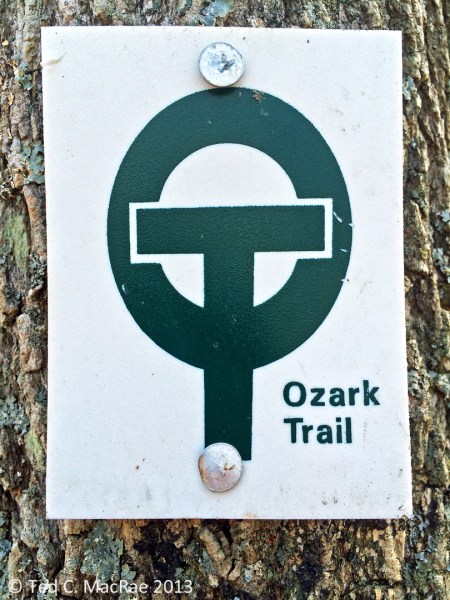
Ozark Trail blaze.

Ozark Trail blaze.

A very close-up shot of a trail blaze. The main watch out with such photos is to ensure the plane of the camera matches the subject precisely, otherwise distortion will cause elongation of one side (making the blaze a trapezoid rather than a rectangle). In post-processing I set the white point in levels by greatly magnifying the image and clicking on a very white part of the blaze to get a more natural looking white rather than the dirty gray that often results when shooting largely white subjects.

Blufftop view of Courtois Creek - from a vantage point several hundred feet above the creek we could look down on our crossing point. I have a fear of heights but nevertheless hung onto the treefall in front of me to inch out for a clear view.

Blufftop view of Courtois Creek – from a vantage point several hundred feet above the creek we could look down on our crossing point. I have a fear of heights but nevertheless hung onto the tree fall in front of me to inch out for a clear view.

This was another photo taken fairly towards the sun. I wanted just a thin band of sky to add a sense of scale to the downward-looking view, but with little sky the camera automatically wanted to expose for the darker foreground, thus blowing the sky. To prevent this, I tilted the camera up slightly to get more sky, touched the screen on the sky to set exposure, then tilted back down to the composition I wanted and took the shot. Post-processing involved aggressive brightening as described for the first two photos above.

Sapsucker damage on an old tree.

Sapsucker damage on an old tree.

I approached this tree from an angle facing the sun, so I simply waited until we passed it and could turn to place the sun behind me while shooting this tree. The trick is to get the right distance for a composition that doesn’t include too much wasted space at the foot of the tree or in its canopy, so this requires some walking back and forth until the right composition is achieved (I do not use the zoom function on the camera unless I have to because of the loss of resolution).
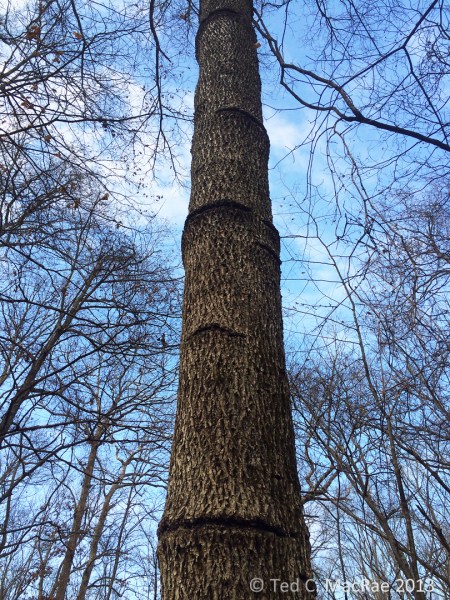
Close-up view of sapsucker damage. Obviously they have been using this tree for many years

Close-up view of sapsucker damage. Obviously they have been using this tree for many years

A closer view of the sapsucker damage—again this is mostly a compositional challenge, which I met by getting close enough to have this interesting “looking up” perspective but still far enough away to include the lowest ring of damage at the bottom of the photo and the highest at the top. Little post-processing other than the standard set was required for this sun-behind-me photograph.

Crystallifolia forms when water drawn from the soil by certain plants oozes out of the stem and contacts frigid air. Additional water pushes out the ice, then freezes itself, resulting in long, thin ribbons of ice that curl around themselves

Crystallofolia forms when water drawn from the soil by certain plants oozes out of the stem and contacts frigid air. Additional water pushes out the ice, then freezes itself, resulting in long, thin ribbons of ice that curl around themselves

For photographing crystallofolia and other small, ground-dwelling features, I like to turn the iPhone so that the lens is on the bottom edge to achieve a true ground-level perspective. The macro capabilities of the iPhone are limited, so in this case I used the zoom function (maybe about 1/3 to full zoom), centered the feature in the photo to get the best exposure and focus, and then did a little more cropping post-processing at the bottom of the photo to minimize the amount of blurred foreground. Again, a mostly white subject such as this tends to come out dull in the native photograph, so I enlarged the image greatly in Photoshop, opened Levels, clicked on set white point, and then clicked on the whitest portion of the subject that I could find to achieve a more ‘naturally’ white subject. It can take a few tries to find a spot in the image that doesn’t result in unnatural over-whitening of the subject—one must play around a bit to find it.

Crustose lichens abound on the dolomite bedrock exposures along the "Narrows" - a long, narrow ridge between the Courtois and Huzzah Creek Valleys.

Crustose lichens abound on the dolomite bedrock exposures along the “Narrows” – a long, narrow ridge between the Courtois and Huzzah Creek Valleys.

Again, I like to use a low perspective for ground features such as these lichen-encrusted rocks strewn across the forest floor. If you let the iPhone focus naturally, it tends to focus on subjects closer to the middle of the photo, so be sure to touch the screen on the foremost subject to set the focus in the foreground. Photos with contrasting colors such as the greens, browns, and blues in this one generally benefit from a little more aggressive increase in saturation (maybe 15-20%) than I normally use for iPhone photos (usually 5-10%).
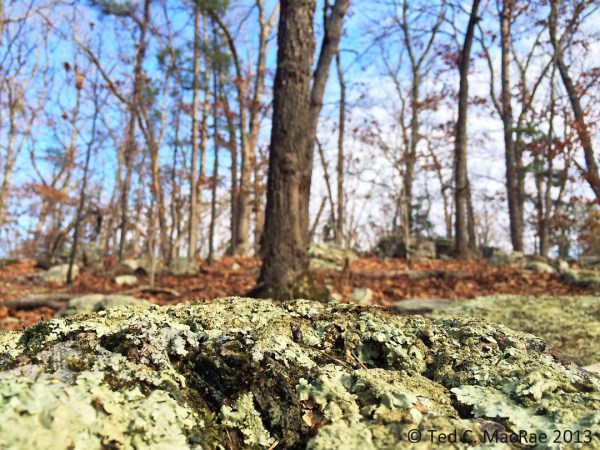
Close-up view of crustose lichens.

Close-up view of crustose lichens.

A semi- wide-angle macro photograph that combines a lichen encrusted rock in the foreground with forest and sky in the background. The camera will automatically focus on the background, so touch the screen at the top of the foreground object to set focus. It also helps to pan back a little bit to include more in the frame than is desired, then crop a little in Photoshop as the lower part of the foreground object will tend to be out of focus unless it is a perfectly vertical surface (rare). In this photo I cropped out about 1/5 from the bottom and a corresponding amount on each side to maintain original aspect ratio.

More dolomite exposures with crustose lichens.

More dolomite exposures with crustose lichens.

Highly dimensional foreground objects add depth and perspective to low-angle shots. Again, it is better to get a little more in the photo than desired and the crop slightly afterwards than to get too close and not be able to do anything about it. Taking the native shot a little further back also ensures that the entire foreground object is in focus.
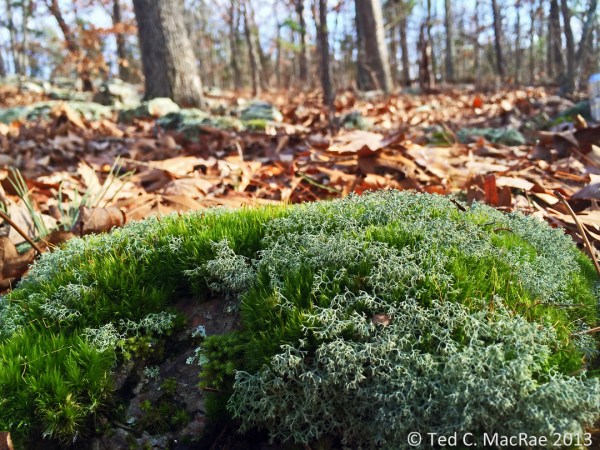
Fruticose lichens and moss intermingle in particularly moist spots.

Fruticose lichens and moss intermingle in particularly moist spots.

Like the close-up photo of the lichen-encrusted rock above, this photo of intermingled moss and fruticose lichens benefits from a low perspective with a high color contrast immediate background (fallen leaves) and blurred deep background (forest/sky) to add perspective. While the latter is not completely blurred, but it’s enough that it doesn’t detract from the main subject. The latter has maximal focus by backing up slightly for the shot and then cropping off the bottom out-of-focus portion in Photoshop. Again, I increased saturation a little more than usual to emphasize the value contrast.
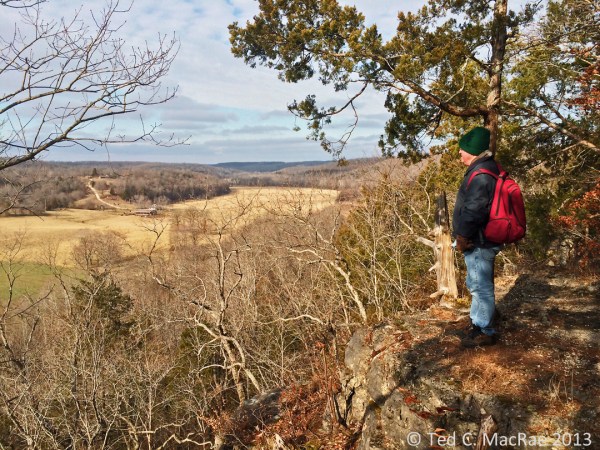
Friend and Ozark Trail co-conspirator Rich Thoma looks out over the Huzzah Creek Valley.

Friend and Ozark Trail co-conspirator Rich Thoma looks out over the Huzzah Creek Valley.

The main challenge with this photo was the shadow cast over Rich by the trees behind him. Setting the exposure on him resulted in a washed out sky, which I really wanted to preserve because of the textured clouds. I also wanted to include a good portion of the sky to give the sense of looking out over a far-below valley, so I set the exposure for the sky. The resulting photo had a good sky, but Rich was hidden in a darkly shadowed area. I used lighten shadows in Photoshop to brighten Rich and the shadowed area where he is standing, and I used aggressively increased saturation to make the many different shades of brown in the rest of the photo pop out.
An ancient red-cedar snag hugs the bluff tops overlooking the Huzzah Creek Valley.

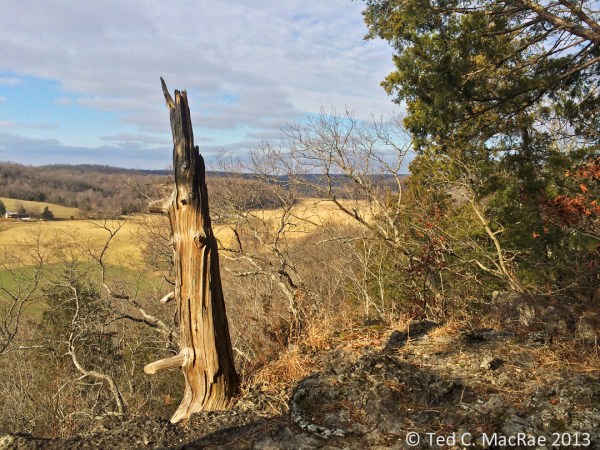
An ancient red-cedar snag hugs the bluff tops overlooking the Huzzah Creek Valley.

This photo had largely the same challenges and was dealt with in the same manner as the previous. The ancient red-cedar snag is an interesting and unusual subject, and I first tried a portrait orientation, but I decided I liked this landscape orientation better because of the ability to include living red-cedar to add a sense of time contrast.
Icicles form on an undercut below the bluff top.

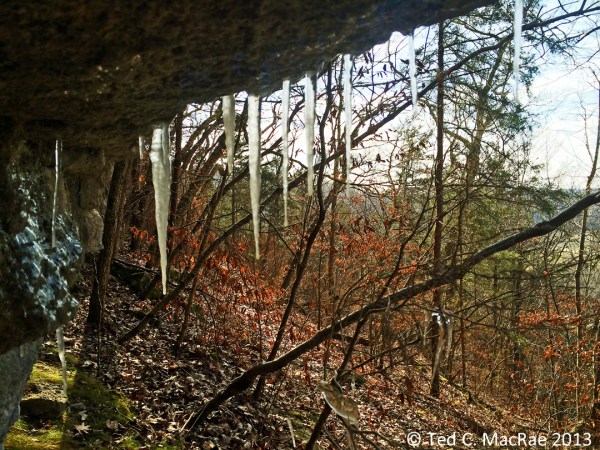
Icicles form on an undercut below the bluff top.

Whenever I find icicles hanging from a rock overhang, I like to provide a more unusual perspective by getting behind the icicles and looking out onto the landscape. It can be hard to get the camera to focus on the icicles rather than the distant landscape—just keep touching them on the screen until it works. I used shadow lightening in Photoshop to brighten the dark rock surfaces in the foreground.

A cap of resistant dolomite lines the top of the Huzzah Creek Valley.

A cap of resistant dolomite lines the top of the Huzzah Creek Valley.

This was a difficult photograph—sun on the pines/cedars on the left overexposed them, while shadows on the naturally dark rock bluff surfaces left them underexposed. This photo was made fairly acceptable by using both “darken highlights” and “lighten shadows” (careful—too aggressive with these features results in unnatural-looking photos), followed by brightening and increasing the contrast, and finally by increasing the saturation. It’s still not a great photo, but sometimes you get what you get.

More icicles.

More icicles.

This larger set of icicles was nicely positioned in front of an interestingly sloped landscape with the sun coming from the left. Again, I got behind them, kept touching the screen on the icicles until the iPhone focused on them, and then adjusted the white point setting in Levels in Photoshop to really make them pop against the rich browns of the landscape behind.

Icicles were especially abundant in this section of the bluff tops.

Icicles were especially abundant in this section of the bluff tops.

A fairly easy shot due to the direction of the sun that required no more than the usual amount of post-processing. Note the perspective, which was to have the rock feature begin right at the bottom left corner of the photograph with some sky above it.

Despite subfreezing air temperatures, sunlight causes water to drip from overhanging icicles, causing ice stalagmites on the ground beneath.

Despite subfreezing air temperatures, sunlight causes water to drip from overhanging icicles, causing ice stalagmites on the ground beneath.

This photo had some dark areas in the foreground that were cropped out, and to emphasize the ice I was more aggressive post-processing with brightening and increasing the contrast. Again, as with most photos with a lot of white in the subject, I adjusted the white point in Photoshop Levels to reduce the “dinginess” that seems natural for ambient light iPhone photos.

Icicles glisten in the frigid sunlight.

Icicles glisten in the frigid sunlight.

In this case, the sun glistening on the icicles and a deep recess behind them provided a natural contrast that I further emphasized in post-processing, along with brightening and setting white point. The icicles suffer from distortion due to my low angle (I’m not that tall!), which I tried to fix with Photoshop’s distort feature but wasn’t satisfied with the result.
Close-up of ice stalagmites, revealing the twigs and petioles around which they have formed.

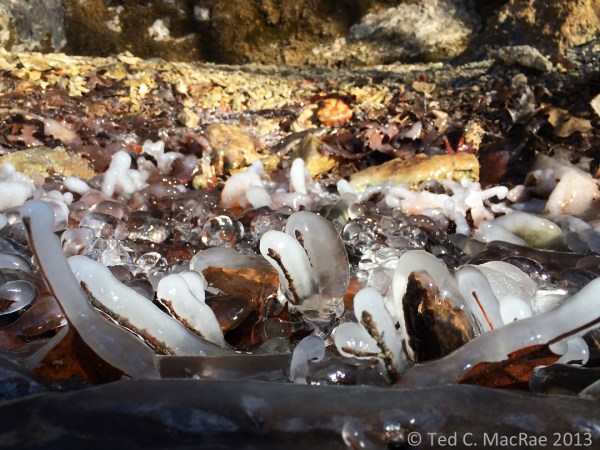
Close-up of ice stalagmites, revealing the twigs and petioles around which they have formed.

The approach with this photo was very much like that used for the close-ups of the lichen-encrusted rocks and intermingled lichens/moss photos—i.e., I backed up a bit to include more foreground than I wanted (which will be blurred at the bottom after setting the focus point on one of the stalagmites) and then cropped it out in post-processing. White subject = setting white point and using more aggressive brightening and contrast.
 Ted MacRae Yesterday ·  Rock, ice, and sunlight converge along the bluff tops


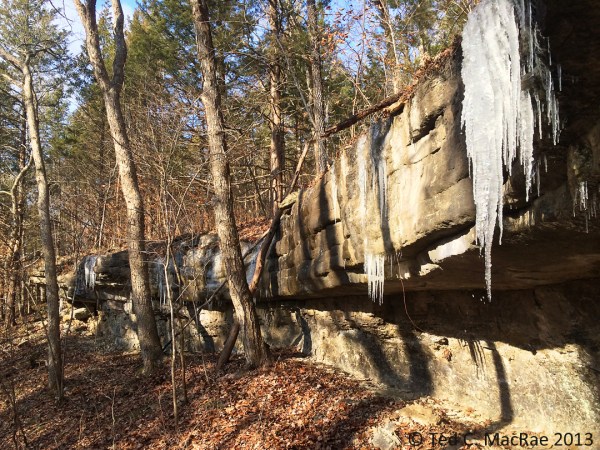
Rock, ice, and sunlight converge along the bluff tops

Again, the formation starts at the lower corner, and in this case the foreground (the right side) also contains an interesting clump of icicles. With the sun behind me, little was required to assure proper exposure, and only normal post-processing was required.

Moss with fruiting structures on a fallen log.

Moss with fruiting structures on a fallen log.

This moss on a fallen log was actually one of the more difficult photographs I took. I took the photo at an angle so that the background fruiting structures would form a solid, blurred red horizon to add depth, but in doing this the iPhone didn’t know where I wanted to focus and kept choosing the background. To force it to “choose” the foreground fruiting structures, I tilted the camera down so that only the foreground was in the frame, touched the screen on the fruiting structures in the back part of the screen to set focus where I wanted, then tilted the screen back again to include the background fruiting structures distant blurred background for perspective. One must shoot quickly when doing this or the iPhone will automatically readjust its focus to the background. I’ve tried shots such as this with the sky in the background, but in my experience the iPhone cannot focus on very thin foreground objects with the sky in the background, and the difference in brightness between the background and foreground is especially difficult to correct. Like the other semi- wide-angle macro shots above, I used the zoom feature (slightly), included a little more in the photo than I wanted, and then cropped out the overly blurred bottom portion of the photo.

Mushrooms on a fallen log.

Mushrooms on a fallen log.

Here is a typical photograph that someone might take of these large, saucer-sized mushrooms on a fallen log. In addition to being a pedestrian view of such a subject, it seems that iPhones sometimes have difficulty registering the correct color for photos taken straight down to the ground. This photo required quite a bit of color correction, and I’m still not overly satisfied with the result.
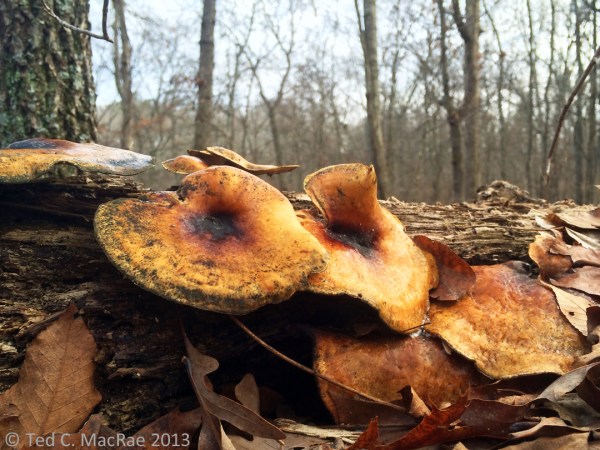
"Bug's eye" view of mushrooms on a fallen log.

“Bug’s eye” view of mushrooms on a fallen log.

As an alternative, I suggest getting low to photograph subjects such as this. The iPhone, with its lens against one edge and screen view, is well-adapted to take such low-angle photos, resulting in a much more interesting photo than the typical “looking down” perspective exemplified above. Inclusion of a little bit of sky in the background also provided some nice color contrast, made easier by shooting away from the sun, which was further emphasized in post-processing by increasing the saturation. As with the other semi- wide-angle macro photographs, a little bit of cropping along the bottom (but do keep the original aspect ratio) also benefited the photograph.

Moss covering the rock exposures in a delightful valley leading up from the Huzzah Creek Valley indicate an abundance of moisture.

Moss covering the rock exposures in a delightful valley leading up from the Huzzah Creek Valley indicate an abundance of moisture.

Last, but not least, this photograph of shaded, heavily moss-laden rock outcroppings bordering a small waterfall needed to be shot very dark in order to avoid “blowing” the sky in the background. Simply pointing and shooting into the shade will cause the iPhone to correctly expose the rocks, but the sky will be blown rather than retaining its blue color. Like the first two photos, I composed the image, then touched the screen on the sky to reduce the exposure. Again, this resulted in a photo that was very dark in the foreground, but this was easily corrected by aggressive brightening, adding contrast, and increasing the saturation post-processing to achieve a nice mix of browns and greens while preserving the blue sky background. In forest shots such as this with a lot of vertical objects, pay attention to distortion while composing the photo to avoid having trees at the edge of the photo “bowing” inwards at their tops. Sometimes this can be avoided by minor adjustments to the tilt of the iPhone while taking the shot, but if your position in the landscape is such that camera tilt alone is not enough to prevent this without losing the desired composition then go ahead and shoot the desired composition and use the “distortion” tool in Photoshop to correct the distortion this works best if bowing is minor).

I hope you have enjoyed this iPhone nature photography tutorial. If you have additional ideas or suggestions please let me know, and also I would be glad to hear of any related subjects you would like me to cover.

Copyright © Ted C. MacRae 2013

A polypipin’ we will go!

A polypipin’ we will go, a polypipin’ we will go
Heigh ho, the dairy-o, a polypipin’ we will go
A polypipin’ we will go, a polypipin’ we will go
We’ll catch a tiger beetle and put him in a vial
And then we’ll let him go (not!)

Okay, maybe my adaptation of the popular children’s song A Hunting We Will Go isn’t the best, but if you want to collect tiger beetles in the genus Tetracha then you’ve got to try the method that my friend Kent Fothergill has dubbed “polypipin’.”

The author polypipin’ in a soybean field in Starkville, Mississippi, September 2013. Photo by Lisa G. Ruschke.

What exactly is polypipin’? Well, it’s when you look for stuff under polypipe—a big plastic tube with holes in it that some farmers use to irrigate their crops. The tube is laid across one end of their field, and when water is pumped into it the water leaks out of the holes along the length of the tube and runs down the furrows between the rows. This is a popular method of irrigation in the Mississippi Delta because the terrain is flat and the equipment costs are much lower than center pivot irrigation systems. Of course, the tube also provides excellent cover for insects and other small critters that live in and around agricultural fields, and these include tiger beetles in the genus Tetracha.

Tetracha carolina under polypipe in a soybean field in Starkville, Mississippi

Tetracha carolina under polypipe in a soybean field in Starkville, Mississippi

I wish I could take the credit, but it was Kent who had the great idea to use polypipin’ as a way to survey for T. carolina (Carolina metallic tiger beetle) in the Mississippi Lowlands (“bootheel”) in southeast Missouri. This is a common species across the southern tier of the United States, but prior to this survey the occurrence of this species in Missouri was not well understood. While a number of specimens had been collected in the bootheel over the years prior to the survey, some regarded Missouri records of the species to be a result of vagrants migrating into the state rather than residents (Pearson et al. 2006). Tiger beetles in the genus Tetracha are nocturnal and take refuge during the day, so they are not often encountered unless one goes at at night with a flashlight. Kent was interested in determining the status of this species in Missouri and had noticed their tendency to take refuge under polypipe—where they could be easily found during the day by simply lifting up the pipe. Rather than give up on sleep, Kent and colleagues surveyed agricultural fields throughout the bootheel by looking under polypipe and demonstrated not only that T. carolina is well established in and a resident of the bootheel, but that it is actually quite abundant and may reside even further north in Missouri than just the bootheel (Fothergill et al. 2011).

Adults are amazingly calm if the polypipe is lifted carefully so as not to disturb them.

Adults are amazingly calm if the polypipe is lifted carefully so as not to disturb them.

I don’t know what it is, but there is just something really fun about polypipin’. Being an agricultural entomologist by day, I have ample opportunity to do a little polypipin’ of my own as I travel across the southern U.S. looking at soybean fields, including this past September when I found myself in fields with polypipe in Arkansas and Mississippi. These photos were taken in Starkville, Mississippi near the Mississippi State University campus, and as has happened in every other case where I’ve looked, I found adults of T. carolina quite abundant underneath the polypipe. Some were found simply resting on the soil surface beneath the pipe, but a great many were observed to have dug burrows under the pipe for added shelter.

Adults often construct burrows underneath the polypipe for additional refuge.

Adults often construct burrows underneath the polypipe for additional refuge.

Polypipin’ works as a survey tool for T. carolina because of that species’ propensity for agricultural fields and other moist, treeless habitats. I’ve not yet found T. virginica (Virginia metallic tiger beetle) under polypipe, but that species is more fond of forested rather than treeless habitats. Perhaps an agricultural field next to forest with polypipe laid on the side adjacent to the forest might produce this species. At any rate, polypipin’ might offer a tool to better define the entire northern distributional limit of T. carolina—all one has to do is look.

REFERENCE:

Fothergill, K., C. B. Cross, K. V. Tindall, T. C. MacRae and C. R. Brown. 2011.Tetracha carolina L. (Coleoptera: Cicindelidae) associated with polypipe irrigation systems in southeastern Missouri agricultural lands. CICINDELA 43(3):45–58 [pdf].

Pearson, D. L., C. B. Knisley & C. J. Kazilek. 2006. A Field Guide to the Tiger Beetles of the United States and Canada. Oxford University Press, New York, 227 pp. [Oxford description].

Copyright © Ted C. MacRae 2013

Q: How do you photograph cactus beetles?

A: Very carefully!

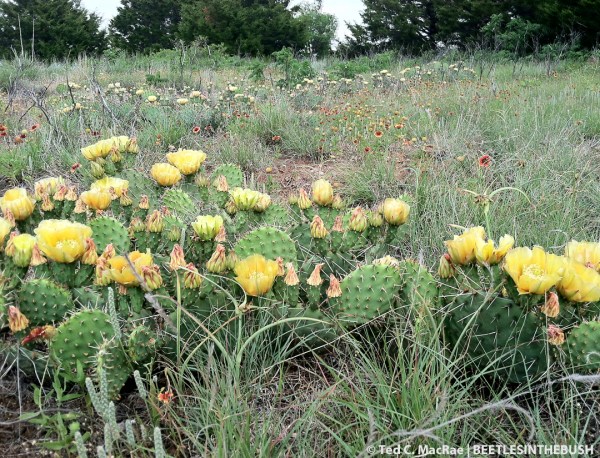
This past June I went out to one of my favorite spots in northwestern Oklahoma—Alabaster Caverns State Park in Woodward Co. The park, of course, is best known for its alabaster gypsum cavern—one of the largest such in the world—and the large population of bats that occupies it. Truth be told, in my several visits to the park during the past few years I have never been inside the cavern. The draw for me is—no surprise—it’s beetles. On my first visit in 2009 I found what is now known to be one of the largest extant populations of the rare Cylindera celeripes (swift tiger beetle), previously considered by some to be a potential candidate for listing on the federal endangered species list, and last year I found the northernmost locality of the interesting, fall-active jewel beetle Acmaeodera macra. This most recent visit was the earliest in the season yet, and as I walked the trails atop the mesa overlying the cavern I noticed numerous clumps of prickly pear cactus (Opuntia macrorhiza) dotting the landscape.

Opuntia phaecantha | Alabaster State Park, Woodward Co., Oklahoma

Opuntia macrorhiza | Alabaster Caverns State Park, Woodward Co., Oklahoma

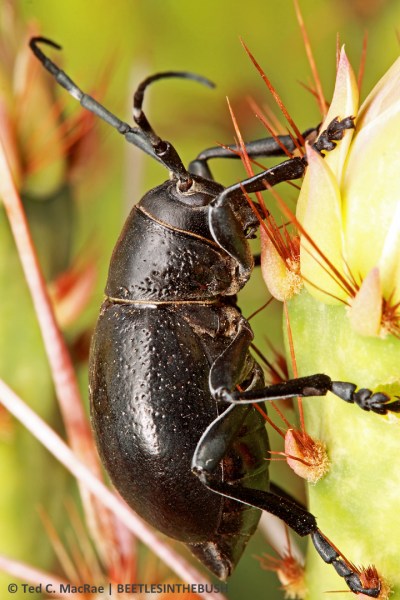
Whenever I see prickly pear cactus anywhere west of Missouri I immediately think of cactus beetles—longhorned beetles in the genus Moneilema. A half-dozen species of these relatively large, bulky, clumsy, flightless, jet-black beetles live in the U.S., with another dozen or so extending the genus down into Mexico and Baja California, and all are associated exclusively with cactus, primarily species of the genus Opuntia. It wasn’t long before I found one, and deliberate searching among the cactus clumps produced a nice series of beetles representing what I later determined as M. armatum. The resemblance between Moneilema spp. and darkling beetles of the genus Eleodes is remarkable, not only in their appearance but also in their shared defensive habit of raising the abdomen when disturbed. The genus has been related taxonomically to the Old World genus Dorcadion, but Linsley & Chemsak (1984) regard the loss of wings and other morphological modifications to represent convergence resulting from the environmental constraints imposed by root-feeding, subterranean habits in arid environments and other situations where flightlessness is advantageous.

Moneilema armatum adult.

Moneilema armatum adult in situ on Opuntia macrorhiza pad.

I have encountered Moneilema beetles a number of times out west, including this species in Texas where it is most common, but since I have only been photographing insects for the past few years this was my first  chance to capture cactus beetle images as well as specimens. The above shot, taken with my iPhone, was straightforward enough, but I wanted some real photographs of the beetle—i.e., true close-up photos taken with a dedicated macro lens. I quickly learned that this would be highly problematic—those cactus spines are long and stiff and vicious, and these beetles are no dummies! Clearly their ability to adapt to such a terrifyingly well-defended plant has had a lot to do with the evolution of their slow, clumsy, flightless, you-don’t-scare-me demeanor. Normally when I photograph insects I do a little pruning or rearranging of nearby vegetation to get a clear, unobstructed view of the subject, and sometimes this also involves “pushing” my way into the vegetation to get the most desirable angle on the subject for the sake of composition. Not so here! In my first attempt, all I could think to do was locate a beetle sitting in repose and try to position myself in some way so that the beetle was within the viewfinder and the cactus’ spines were not impaled within my arms! The photo below shows the only shot out of several that I even considered halfway acceptable, but clearly the spines obstructing the view of the beetle were not going to be to my liking.

First attempt - looking down into plant where beetle was first sitting.

First attempt – looking down into plant where beetle was first sitting.

What to do? The beetle was behaving fairly well (i.e., it was not bolting for cover upon my approach), so I pulled out a pair of long forceps (that I carry with me for just such cases) and used them to gently prod the beetle into a more exposed position. The beetle crawled up onto one of the unopened cactus flower buds and perched momentarily, and I thought I had my winner photograph. I crouched down again, was able to get a little bit closer to the beetle than before, and fired a few shots. Looking at them in the preview window, however, left me still dissatisfied—the beetle was no longer obstructed, but the background was still jumbled, messy and dark, making it difficult for the dark-colored beetle to stand out. I would need to think of something else.

Second attempt - looking down on beetle after coaxing it up.

Second attempt – looking down on beetle after coaxing it up.

I actually take a lot of my photos with the insects sitting on plant parts that have been detached from the plant. This allows me to hold the plant in front of whatever background I choose and micro-adjust the position of the insect in the viewfinder for the best composition. This is “easier” (a relative term) with a shorter lens (think MP-E 65-mm) because the lens-to-subject distance matches almost perfectly the distance between my wrist and my fingers, allowing me to rest the camera lens on my wrist while holding the plant part with my fingers to “fix” the lens-to-subject distance. These beetles, however, are much too big for the MP-E 65-mm, so I had to use my longer 100-mm macro lens. The longer lens-to-subject distance does not allow resting the lens on my wrist, so I must come up with other ways of bracing myself and the subject to minimize movement. Detaching the pad on which the beetle was resting (and if you’ve never tried to detach an Opuntia cactus pad from its parent plant while trying not to disturb a beetle sitting on it, I can tell you it is not an easy thing), I also discovered that the pad was quite heavy and that holding it with the same forceps that I had used to prod the beetle (because of its vicious spines) was yet another unanticipated difficulty. I decided the best way to deal with it would be to get down on one knee in front of the plant, rest my arm on my other knee with the cactus pad extending out in front of me, and photograph the beetle with the plant as close in the background as possible to achieve a lighted and colored background that would help the beetle stand out. Following are examples of those attempts.

Third attempt - holding detaching pad with forceps for better view.

Third attempt – holding detaching pad with forceps for better view.

Detached allows even better close-ups.

Detached allows even better close-ups.

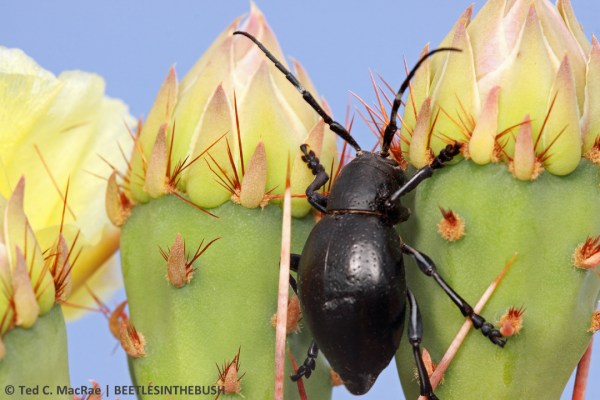
Better for sure, especially the latter, closer one. Still, I wasn’t satisfied—the backgrounds still just had too much clutter that detracted from the beetle and complicated the lighting. I decided to go for broke—why not go for the blue sky background, the cleanest, most natural and aesthetically pleasing background possible! This actually was my first thought when I saw the beetles, but I could never find one on a high enough plant that was growing in a situation where I was able to crouch low enough to get the angle with the sky in the background. By this time my arm was quite weak from holding the heavy cactus pad and squeezing the forceps firmly, and as I contemplated how I could possibly hold the pad up towards the sky and take the shots without being able to rest the camera on my arm I had an idea. Why not rest my arm on the camera? Specifically on top of the flash master unit atop the camera. I adjusted the camera settings for blue sky background, positioned the cactus pad in the forceps so that the pad (and beetle) were hanging down from the forceps but still in an upright position, pointed the camera to the brightest part of the sky (a few degrees from the sun), and then held the cactus pad out in front of the camera with my arm resting on the flash master unit. It worked! My arm still got tired quickly and needed frequent breaks, and I had to do a number of takes to get the exposure settings and composition I was looking for, but the photo below represents my closest approach to what I envisioned when I first knelt down to photograph these beetles. A clear view of the beetle, on its host plant, with lots of nice value contrast between beetle, plant and background.

Fourth attempt - holding detached pad up against sky for cleaner background.

Fourth attempt – holding detached pad up against sky for cleaner background.

Once I had the technique figured out, I was able to get some really close-ups shots as well, still, however, with enough blue sky in the background to make it clean and pretty…

Zooming in with sky background gives a nice, clean close-up.

Zooming in with sky background gives a nice, clean close-up.

…as well as playing with some unusual compositions that one can afford to try only after they are confident they have gotten the required shots. I am particularly fond of the following photo, in which the beetle appears to be “peeking” from behind its well-defended hiding place on its host plant.

Having a little fun with the close-ups - he's peaking!

Having a little fun with the close-ups – he’s peaking!

If you have any experiences photographing these or other such “well-defended” insects (without resorting to the white box!) I would love to hear about them.

REFERENCE:

Linsley, E. G. and J. A. Chemsak. 1984. The Cerambycidae of North America, Part VII, No. 1: Taxonomy and classification of the subfamily Lamiinae, tribes Parmenini through Acanthoderini. University of California Publications in Entomology 102:1–258 [preview].

Copyright © Ted C. MacRae 2013

How to pack and ship pinned insect specimens

Even though I don’t work in a museum, sending and receiving pinned insects is a routine activity for me. As a collector of beetles with some expertise in their identification, I’ve had opportunity to exchange with or provide IDs to other collectors from around the world. Of course, the extreme fragility of dried, pinned insect specimens makes them vulnerable to damage during shipment, especially when shipped overseas. While properly labeled, pinned insect specimens have no monetary value, the scientific information they represent is priceless, and every attempt should be made to protect them from damage during shipment. Sadly, despite our best efforts damage is sometimes unavoidable, as even packages marked “Fragile” can be subject to rough or careless handling. More often than not, however, I have received shipments in which the contents suffered damage that could have been avoided had the sender paid more attention to packing the shipment in a manner that gave it the best possible chance of arriving safely. Here I offer some general tips on the best way to pack and ship pinned insect specimens for shipment. While these remarks are broadly applicable to pinned insects in general, they are given from the perspective of a someone who collects beetles—specimens of which are relatively small to moderate in size, hard-bodied, and compact in form. Insects from other groups, especially those with large, fragile species such as Lepidoptera and Orthoptera, may require additional precautions to minimize the risk of damage.

  1. Select a sturdy specimen box with a firm pinning bottom. The size of the box should be selected appropriate for the number of specimens—i.e., do not select a large box for only a few specimens or tightly pack too many specimens in too small a box,  Modern polyethylene foams used in pinning trays seem sufficiently firm to hold pinned specimens during shipment as long as they are at least ¼” thick—thicker foams, of course, will hold even more firmly but often “push” the labels on the pinned specimens up against each other, necessitating additional labor to reset them. The box should have a tight-fitting lid that can be set firmly in place. Pin the specimens into the box, making sure the pins are set completely through the foam and taking care not to overpack the specimens within the box too tightly (body parts, especially antennae and tarsi, should never overlap) that could result in damage to them or adjacent specimens during removal. Ideally the specimens should fill the box completely, but if they do not then fill the empty space with blank pins to avoid large, blank areas of foam bottom without pins. Here is an example of a filled specimen box:

    Pinned insects in specimen box ready for packing.

    Pinned insects in specimen box ready for packing.

  2. Use brace pins for large or heavy specimens. This is one of the most common mistakes I see! In the example above, several of the larger species are surrounded by brace pins to keep them from rotating on their pins and damaging neighboring specimens. At least two pins should be used—I place them against the elytra on each side behind the hind legs, and very long or heavy specimens should be further braced by additional pins on each side of the thorax to further ensure they are fully immobilized. Although not shown in this example, specimens with very heavy heads (large mandibles, etc.) should be even further immobilized with additional pins at the head. Here is a closeup view of some of the specimens in the above box that have been further secured with brace pins:

    Large specimens are further immobilized with brace pins.

    Large specimens are further immobilized with brace pins.

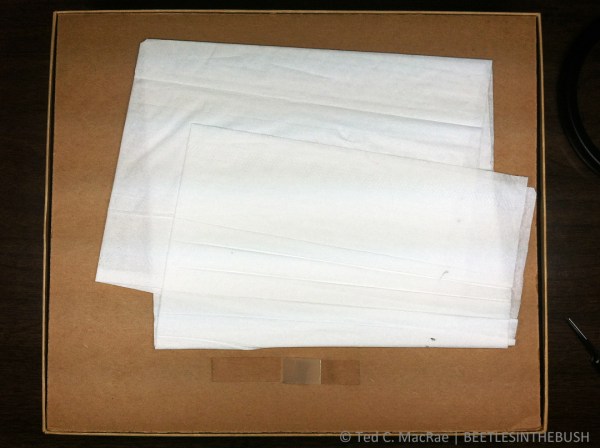
  3. Use an inner lid with padding to hold it firmly against the specimens. An inner lid lies on top of the specimens underneath the specimen box lid to keep the specimens securely seated in the foam and prevent them from “working” their way out. Some specimen boxes designed for shipping, such as the examples shown in these photos, come with an inner lid that is hinged on a long side. If the specimen box lacks an inner lid, one should be fashioned from cardboard or heavy card stock. The advantage of an attached inner lid is that it will not move inside the box, so if an inner lid must be fashioned it is essential to trim it so that it fits precisely within the box to minimize the potential for movement. I like to draw an outline on the cardboard with the specimen box and cut on the lines, then shave off extra material from each side to shape it to the inside perimeter of the box. Either way, make a “pull tab” out of adhesive tape and attach it to the inner lid to allow easy removal during unpacking. If the inner lid when set in place does not seat firmly against the outer lid, extra padding material such as paper towels should be placed on top of the inner lid to ensure that it sits firmly against the specimens when the outer lid is set in place. The specimen box with inner lid in place, pull tab attached, and extra padding placed on top is shown below:

    Cover the inner lid with padding to secure it firmly against the specimens.

    Cover the inner lid with padding to secure it firmly against the specimens.

  4. Seal closed specimen box with tape or rubber bands. The outer lid of the specimen box should be secured in place so that it does not “work” its way loose. Some people use tape, which is effective but must be cut if the box is opened for inspection, leaving the lid unsecured afterwards. I prefer to use sturdy rubber bands, which can be removed for inspection and then easily replaced afterwards. Some specimen boxes come equipped with metal tabs or hoops that fit through slots on the outer lid and that can be bent over to secure the lid in place. In my experience, these often break off after repeated use, so rubber bands or tape are a good insurance policy for such boxes. Another common practice is to wrap specimen boxes in packing paper or place them inside plastic, Zip-Lock bags. This was necessary in the days when excelsior shavings were often used as a packing material around the specimen box, which contained shavings that could work their way into the specimen box and cause damage. With the ready availability of modern packing materials such as foam peanuts there should no longer be any reason to use excelsior shavings. Still, wrapping or sealing inside a plastic bag can’t hurt if it is desired. A closed specimen box with rubber bands securely in place is shown in the photo below:

    Specimen box sealed with rubber bands

    Specimen box sealed with rubber bands

  5. Place an address label on the specimen box. This will ensure that the shipment does not get tossed into the “dead mail” pile if the outer address label is lost or destroyed (I’ve left the label off in these examples to ensure privacy of the recipient).
  6. Secure multiple specimen boxes tightly together. If multiple specimen boxes are shipped together, they should be secured tightly together so that they cannot “bump” into each other during shipment. As mentioned before, tape works but might end up being cut for inspection, so I prefer to use large rubber bands. String can also be used to tie the boxes together, but unless the inspection agent is handy with knots the boxes may not get tied back together. The two specimen boxes included in the shipment I used for this example, secured tightly together, are shown below:

    Multiple boxes should be bound tightly together.

    Multiple boxes should be bound tightly together.

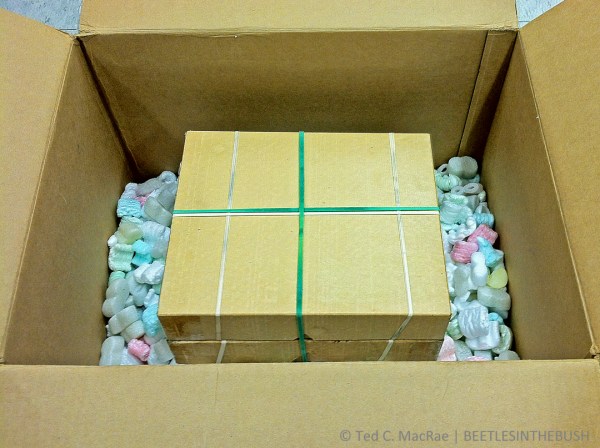
  7. Pack specimen box inside an oversized shipping boxShipping box size selection is critical! The shipping box should not only be sturdy but also big enough to accommodate specimen boxes with at least 3–4 inches below and 2–3 inches on top and each side of the specimen box. This space is necessary to allow the packing material to function not only as cushioning but also in “shock absorption.” My preferred packing material is foam peanuts, since it doesn’t settle during shipment and the amount used can be tailored precisely to the needs of an individual box. The photo below shows the pinning boxes resting on a 4-inch layer of foam peanuts with at least 2–3 inches of space on the sides and above:

    Place specimen boxes inside a sturdy shipping box with plenty of room on all sides.

    Place specimen boxes inside a sturdy shipping box with plenty of room on all sides.

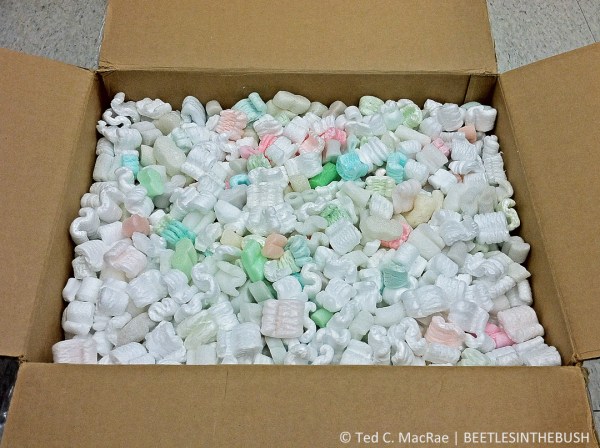
  8. DO NOT OVERPACK! This is the most common mistake people make! The packing material needs to serve two purposes: 1) provide a crush zone to protect from direct damage, and 2) provide shock absorption to protect from damage by impact jarring. The specimen box actually needs to be able to move slightly within the closed shipping box. If it cannot, energy from impacts is transmitted in full to the specimens inside, greatly increasing the risk that heavier body parts (especially the head/pronotum) will be jarred off the specimens. This not only results in damage to the broken specimen, but the dislodged body parts then act as “wrecking balls” that bounce and tumble inside the specimen box, destroying all of the specimens within their reach. After placing a 3–4-inch layer of packing in the bottom of the shipping box, I like to set the specimen box(es) on top of the foam in the center of the shipping box and fill the shipping box with additional foam peanuts to within about 1″ of the top. Avoid the temptation to fill the box to the brim, or to “settle” the foam peanuts and add a few more, as this will result in a tightly packed box that does not protect the specimens as well as a more loosely packed box. To test, close the flaps on top of the box and give the box a light up-and-down “shake”—you should feel the specimen box bounce slightly inside. If it does not, remove a small amount of packing peanuts and repeat the test. If you cannot remove enough packing peanuts without exposing the top of the specimen box inside, your shipping box is too small and you should select a larger size. The photo below shows the shipping box filled with packing peanuts to the proper level:

    Shipping box ''almost'' filled with packing material.

    Shipping box ”almost” filled with packing material.

  9. Label the package “FRAGILE”. Whether this is actually helpful or invites abuse by some passive aggressive handler is a matter of debate, but I am of the opinion that a majority of shipping personnel will actually treat the package with a little more respect if they see this label, especially with the disclosure that the contents are preserved insects with no commercial but extreme scientific value. Additionally, disclosure of such information may actually be required by some destination countries, so it’s a good idea to label packages as a matter of routine practice. I like to place one label on top of the shipping box and additional labels on all four sides. BioQuip Products sells moisture-activated adhesive labels as shown below, or similar labels can be designed in a word processing program and printed on blank adhesive labels; however, the latter should be covered with clear tape to prevent them from peeling off of the shipping box during transit.

    Place a fragile sticker on top and all four sides.

    Place a fragile sticker on top and all four sides.

Much of what I have written here I learned as a graduate student, based on a much more detailed article by Sabrosky (1971) that provides additional suggestions for extremely rare and valuable specimens, advice regarding the different postal classes available for international shipments, and a list of “Don’ts” under any circumstances.

Disclaimer: I am an amateur—albeit a highly practiced one, and there may be additional suggestions or advice from professional collection managers and museum curators that would be highly welcomed in the comments below  should it be offered.

REFERENCE:

Sabrosky, C. W. 1971. Packing and shipping pinned insects. Bulletin of the Entomological Society of America 17(1):6–8 [preview].

Copyright © Ted C. MacRae 2013
Just another ‘bug on white’

“White box” photography seems to have become quite popular for insects during the past couple of years, and what used to be a rarely used technique for photographing insects has become rather commonplace. It’s really not that hard to do—all you need is a camera, a flash, an insect, and… um, a white box. Put the insect in the box (maybe cover it with a petri dish and turn the lights off for a bit of time until it settles down), direct the flash towards the interior of the box, and start shooting. It takes only a little bit of trial and error to dial in the proper flash direction and duration (or flash exposure compensation if you use ETTL), and the results can be dramatic, especially if you post-process to enhance levels, contrast, brightness, etc. You can even cheat a little and skip the white box if you have a good flash diffuser and don’t care that there might be a little bit of gray in the furthest reaches of the background (pleading guilty here)—just place the bug on white paper and shoot away.

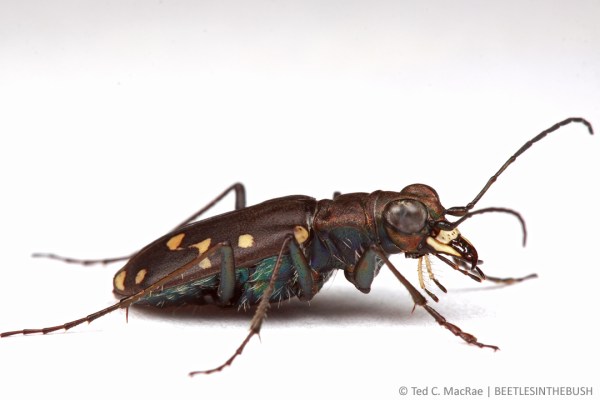
Cicindela oregona oregona | Topaz Lake, California

Cicindela oregona oregona | Topaz Lake, California

I guess I can’t complain about the new-found popularity of “bug-on-white” photography—anything that makes insects more appealing to the general public is a good thing, and the purity of the photos seems not only to enhance the appearance of the insects but actually makes them seem… well, “cleaner.” Nevertheless, I’ve only dabbled in bug-on-white photos and not gotten into the technique in a big way. The reason for this is that I still, all things being equal, prefer to photograph insects in the field in their native habitats—hopefully also exhibiting interesting natural behaviors. That is the goal, of course, but it is not always a possibility, especially when it comes to one of my favorite subject groups—tiger beetles. Photographing tiger beetles in the field is a challenge due to their extremely wary habits, swift running and rapid flight capabilities, and penchant for extreme, often hostile habitats. Many times I am up for the challenge and will spend whatever time it takes and suffer all manner of indignance to get the shot. However, there are times when there are other tasks at hand or a perfect storm of conditions makes the beetles simply impossible to approach. This was one of those times.

Cicindela oregona oregona | Topaz Lake, California


We encountered the beetle shown in these photos on the California side of Lake Topaz along its muddy southwestern banks. The beetles were not numerous—unusual for the species Cicindela oregona which can oftentimes be quite abundant along shoreline habitats throughout the western U.S. Time was at a premium, as it was supposed to be just a quick stop to see what might be found as we headed further south into Mono Co. to look for some rather spectacular longhorned beetles in the genus Crossidius unique to the area. An added difficulty was the habitat—the beetles were at the edge of a very shallowly pitched mudflat, preventing us from reaching the water’s edge without sinking deeply into the rancid mud. Between this and their scarce numbers, field photographs would have required more of an investment in time and cleanup than I was prepared to spend, so I netted a few individuals for the record and kept one alive for photographs later that night in the comfort of my hotel room.

xxx

One of the nice things about bug-on-white photographs is the ability to get a variety of carefully executed compositions from the most optimum vantage point. Lateral profile shots are almost a requirement, as are shots with the head of the insect slightly turned towards the lens. Of course, I cannot photograph a tiger beetle and not take the perfectly centered, full-on face shot. In all of these cases, the ability to get the camera truly “down” on the subject’s level means that I can maximize the use of low perspective, and nowadays I don’t even bother with dorsal shots that might be good for some future field guide but that I find really quite boring in their aesthetics.

xxx

In fact, you can even take the low perspective to the extreme by actually elevating the subject and coaxing it towards the edge of its platform to allow photography from below. Compare the above frontal portrait of the beetle, taken from a particularly extreme low perspective, with the photo above it, taken at the same level as the subject. Both photographs provide an interesting and aesthetically pleasing perspective, but in very different ways despite the small change in the angle of the camera—the upper photo is pleasing due more to the symmetry of the composition, while the lower photo derives its interest in the unusual perspective that highlights the setose mouthparts and bulging eyes.

xxx

I have long wanted to photograph a tiger beetle with blue sky background (hat tip to Thomas Shahan for giving me that idea during the inaugural BugShot). Sadly, I have not succeeded in doing this. The main problem is in trying to get an extremely wary subject in just the right place at the right time. Since these beetles occur on the ground rather than being elevated on foliage (at least under normal circumstances in the U.S.), one must find a spot where the ground drops sharply enough to allow the photographer to get below the subject, and then somehow get the tiger beetle to pose right at the edge of the precipice. The above photograph is sort of a simulation of the kind of photo I am striving for, achieved in this case by (are you ready for this?) hanging a pair of blue underwear behind the subject, which is sitting on a piece of white paper placed at the edge of the table. The combination of “blue-sky” and bug-on-white techniques is interesting, but don’t think I’ll be able to rest until I have succeeded in a true field version of this photograph. If anyone manages to achieve this before I do, please let me know how you did it (in exchange for me having given you the idea :)).

Copyright © Ted C. MacRae 2013
Under Blood Red Skies

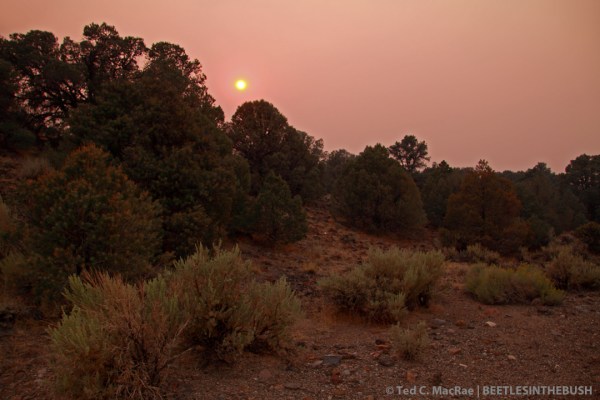
At the start of my recent Great Basin collecting trip, I found myself presented with a rather unique and unanticipated photographic opportunity. As I landed in Reno, Nevada, the then 6-day old Rim Fire was already well on it’s way to becoming the largest wildfire on record in the California Sierra Nevada. As acre after acre of the Sierra’s dramatic coniferous forest succumbed to the blaze, an enormous plum of smoke drifted northward for several hundred miles over eastern California and western Nevada, blanketing the area in a thick haze that turned the sun’s hot glare to a soft glow and limited visibility to under a mile. It was like a thick overcast foggy day, only without the cool, damp humidity. This was of little consequence to our business at hand—collecting beetles (although it did make pointless most attempts to photograph the area’s stunning landscape). At day’s end, however, a dramatic transformation took place in the sky as the sun sank lower and lower, turning to an increasingly red globe as it strained to shine through the ever thicker layer of smoke and haze. Then, for a few brief moments, the sun floated—a dark red globe under blood red skies—before the thick bottom layers of haze finally extinguished its fading light.

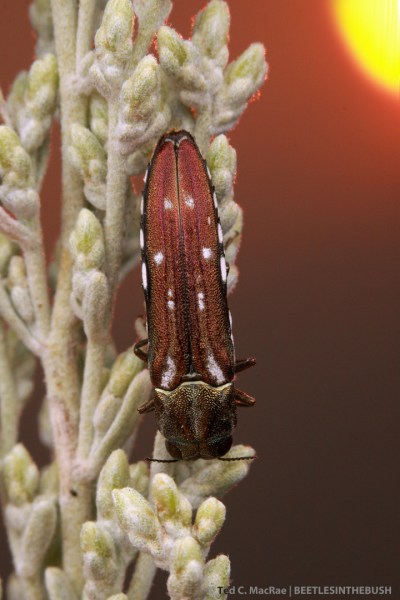
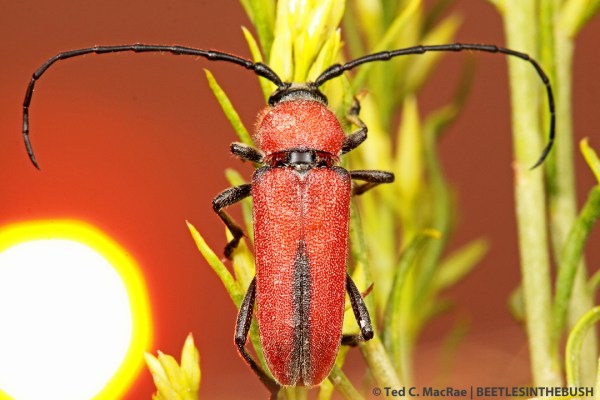
I’ve just begun trying to incorporate setting suns into my photography, having made to this point only a few attempts over Midwestern landscapes. I’m not really sure what gave me the idea, but I thought it might be fun to try incorporating the spectacular sun and unusual sky I was seeing as backgrounds in full-flash insect macrophotographs. Perhaps it seemed a logical progression from the natural sky background macrophotographs that I’ve put a lot of effort into perfecting this year. It was certainly a learning experience, but the basic principle is the same as it is for blue sky background—finding the right combination of camera and flash settings to balance flash illumination of the subject with ambient illumination of the background. The most difficult thing was, surprisingly, getting the sun in the desired position within the composition, as it does not appear through the viewfinder as the discrete ball that is seen in the photos. Rather, it appears as a large, amorphous, blinding flash that comes and goes as one pans across it, leading to a lot of guesswork regarding its actual position within the composition.

I gave a sneak preview of one of these photos in Sunset for another great collecting trip, and several of the photos I’ve shared since then have featured the remarkably colored sky in the background. Here are some other attempts that I was happy with:

Agrilus walsinghami (female) | Washoe Co., Nevada

Agrilus walsinghami (female) | Washoe Co., Nevada

Agrilus walsinghami (male) | Washoe Co., Nevada

Agrilus walsinghami (male) | Washoe Co., Nevada

Crossidius coralinus temprans (male) | Pershing Co., Nevada

Crossidius coralinus temprans (male) | Pershing Co., Nevada

Initially hot yellow (previous photo), the sun turns to soft yellow...

Initially hot yellow (previous photo), the sun turns to soft yellow…

...then yellow-red...

…then yellow-red…

...and finally blood-red!

…and finally blood-red!

Crossidius hirtipes macswainei (female) | Lyon Co., Nevada

Crossidius hirtipes macswainei (female) | Lyon Co., Nevada

Sunset over Toiyabe National Forest | Lyon Co., Nevada

Sunset over Toiyabe National Forest | Lyon Co., Nevada

Gray rabbitbrush (Ericameria nauseosa) | Lyon Co., Nevada

Gray rabbitbrush (Ericameria nauseosa) | Lyon Co., Nevada

Copyright © Ted C. MacRae 2013

Sunday Spider: Backlit Araneus

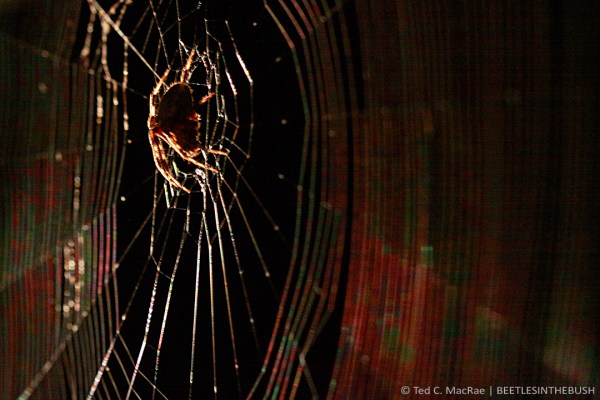
Araneus sp. | Wildwood, St. Louis Co., Missouri

Araneus sp. | Wildwood, St. Louis Co., Missouri

Letting the dog out tonight, I encountered this spider—presumably in the genus Araneus—who had strung up her web in the corner of the doorway and was eerily backlit when I turned on the porch light. Without a tripod that would allow me to position the camera about 7′ above the floor and make use of a super long exposure, my only option for capturing the scene hand-held was to crank the ISO all the way up to 3200, ratchet down the shutter speed to 1/20th sec, and open up the aperture to f/5.6 (any lower and the shallow depth of field would have been unacceptable). Heavy-handed processing to reduce noise and increase sharpness yielded a serviceable photo; however, I’ve been thinking about getting a tripod lately, and the chance to produce much better versions of scenes like this only strengthen those thoughts.

Copyright © Ted C. MacRae 2013

Tips for photographing shiny beetles on yellow flowers

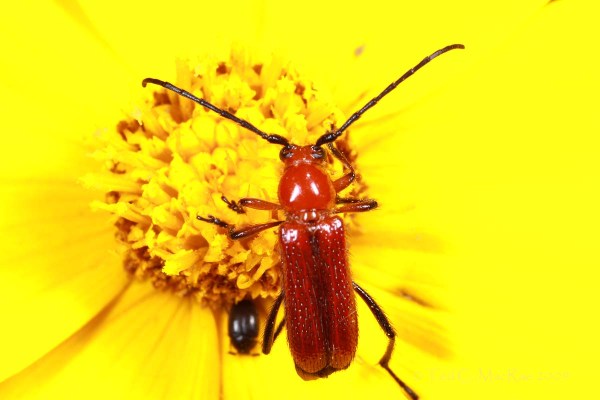
I really hate starting off this post with the following photo—typically it is the first photo in a post that readers see in syndicated feeds; however, I use it in this post to make a point. This photo was taken back in May 2009 and is among the very first photographs that I took after getting my current dSLR camera setup. I was certainly happy enough with it at the time; however, in the following years I have learned a lot about lighting and composition. Such is the curse of any photographer—the further back one goes in their portfolio, the less satisfied they are with the photos taken at a particular point in time. What was then a pretty photo of a shiny, red longhorned beetle on a bright, yellow flower is now teaching material for what not to do when taking photos of shiny beetles on yellow flowers.

One of my first photos of Batyle suturalis, taken in May 2009 | Franklin Co., Missouri

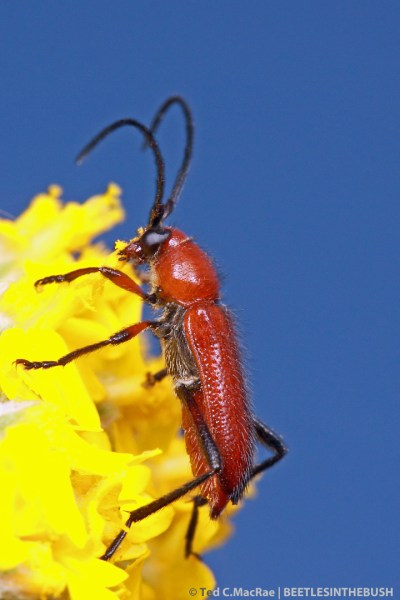
Batyle suturalis on Coreopsis lanceolata | Shaw Nature Preserve, Franklin Co., Missouri

Compare the above with the following much more recently taken photos of the same beetle species from this past June. The beetle is the same, and while the flowers are a different species they are the same intense shade of yellow, but in nearly all respects the photos are far superior to the first. What are the problems with the first photo? First, the smooth and shiny surface of the beetle combined with poor diffusion of the flash has resulted in intense specular highlights on the body of the beetle. This is especially evident in the “twin highlights” on the pronotum of the beetle that is the signature mark of the Canon MT-24EX twin flash unit when used without some type of diffuser. Secondly, the darker color of the beetle requires more flash for adequate illumination than does the much brighter yellow flower—setting the flash power high enough to fully expose the beetle resulted in overexposure of the yellow flower. One cannot even see where one petal ends and another begins. Thirdly, the top-down perspective is, well… boring, no doubt because this is far and away the most commonly used composition in photographs of insects on flowers. Lastly, in my zeal to get as close as possible to the subject, I’ve not only eliminated elements from the background that could add interest in texture to the composition but also clipped the hind tarsus of the beetle itself.

Batyle suturalis on paperflower (Psilostrophe villosa) | Alabaster Caverns State Park, Woodward Co., Oklahoma

Batyle suturalis on Psilostrophe villosa | Alabaster Caverns State Park, Woodward Co., Oklahoma

The first problem is easily addressed by using a good diffuser. It is remarkable that both Canon and Nikon have produced such incredibly effective lenses and flash units for macrophotography, yet completely ignored the demand for diffusers designed to work with them. As a result, most insect macrophotographers have resorted to various do-it-yourself (DIY) designs to fill the void. The diversity in DIY diffuser designs is as large as the diversity of insect macrophotographers, and each person has their own favorite. I have tried many different versions myself, and my current design (admittedly a fusion of ideas stolen from and Alex Wild and Piotr Naskrecki) has produced quite good results. This is evidenced in the more recent photos shown here by the very soft highlights that are spread out evenly over the body of the beetle and not concentrated into intense spots or bands.

Batyle suturalis

Portrait orientation is under-utilized in ”bug on a flower” shots.

The second problem—that of overexposure of the flower to properly expose the beetle—is handled in a simple yet somewhat counter-intuitive manner. I find yellow flowers to be especially prone to overexposure. However, it is much easier to “fix” underexposed than overexposed areas of a photo in post-processing. When a photo is underexposed, all of the data regarding color and hue is still there. It is a simple matter to increase the brightness in the image processing software to restore underexposed areas to their natural brightness. Overexposure, however, is much more difficult to correct, as once the exposure is “blown” there is no data remaining regarding the true color and hue. The only way to fix blown highlights is with the laborious process of cloning over them with nearby areas of the photo that are not blown. Perhaps some can do this quickly and with good results, but I am not one of those people. I like to selectively increase the brightness of underexposed areas using “Lighten Shadows” tool in Photoshop. Be careful, as a light hand is all it takes—overly heavy-handed adjustments look  unnatural.

Batyle suturalis

Side profiles are more interesting than ”top down” shots and allow high color-contrast backgrounds.

Finally, think about more interesting compositions for your “bug on a flower” photos than the far too commonly used top-down perspective. Getting low relative to the beetle and looking at it from the side or front not only provides a less common view of the subject but also allows for far more creativity in the overall composition. My personal preference for insects on flowers is a blue sky background, which can add a lot of value contrast to photos compared to those in which the entire background consists only of the flower on which the insect is sitting. Use of blue sky background can also further help avoid overexposure of the yellow flower, as the slightly higher ISO and slightly lower aperture settings and shutter speeds used in that technique serve to increase the amount of ambient light contributing to the photo, thereby reducing the amount of illumination needed by the flash. Side views of the insect also facilitate use of portrait orientation—an important consideration if you are interested in producing photos for potential use on journal or magazine covers (nearly always printed in portrait). Also, as you compose your photo, try backing off a bit rather than trying to focus in on the subject as tightly as possible. Backed off views not only avoid the more straightforward problem of clipping parts of the insect but can also result in much more aesthetically pleasing photographs by allowing the incorporation of other elements in the composition for balance, scale, and even a sense of motion or dynamics (as exemplified by the partially buried grass blades in this photo of the Eastern Big Sand Tiger Beetle). Photos can always be cropped in post-processing, and while excessive cropping as a way to artificially increase magnification is to be avoided, there is nothing wrong at all with slight cropping to improve composition.

Copyright © Ted C. MacRae 2013